Over the past several years, USC Upstate faculty have worked diligently to revise and update course materials and are well prepared to meet the April 2026 WCAG compliance deadline. These efforts have resulted in more accessible PDFs, PowerPoint presentations, documents, images, and videos, expanding access to barrier-free course content to a wider range of students. As we build on this important technical foundation, we also have opportunities to think more broadly about accessibility in course design, including how emerging practices like Role, Context, and Task Prompt Engineering can expand the adoption of more Universal Design for Learning practices.
Continue reading “Using AI to Expand Universal Design for Learning”Start at the Library to Achieve Your Course Accessibility Goals
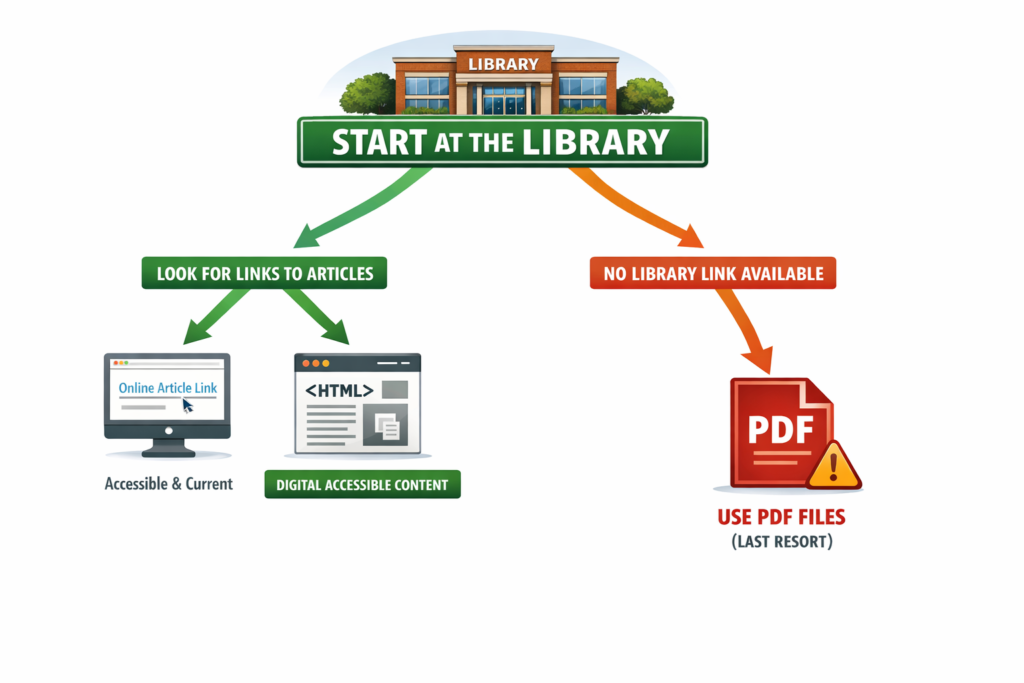
When selecting materials for your courses, where you start can make all the difference. Beginning your search at the library not only saves time, but it also helps ensure students have current, accessible content to supplement your instruction.
Start with Library Links
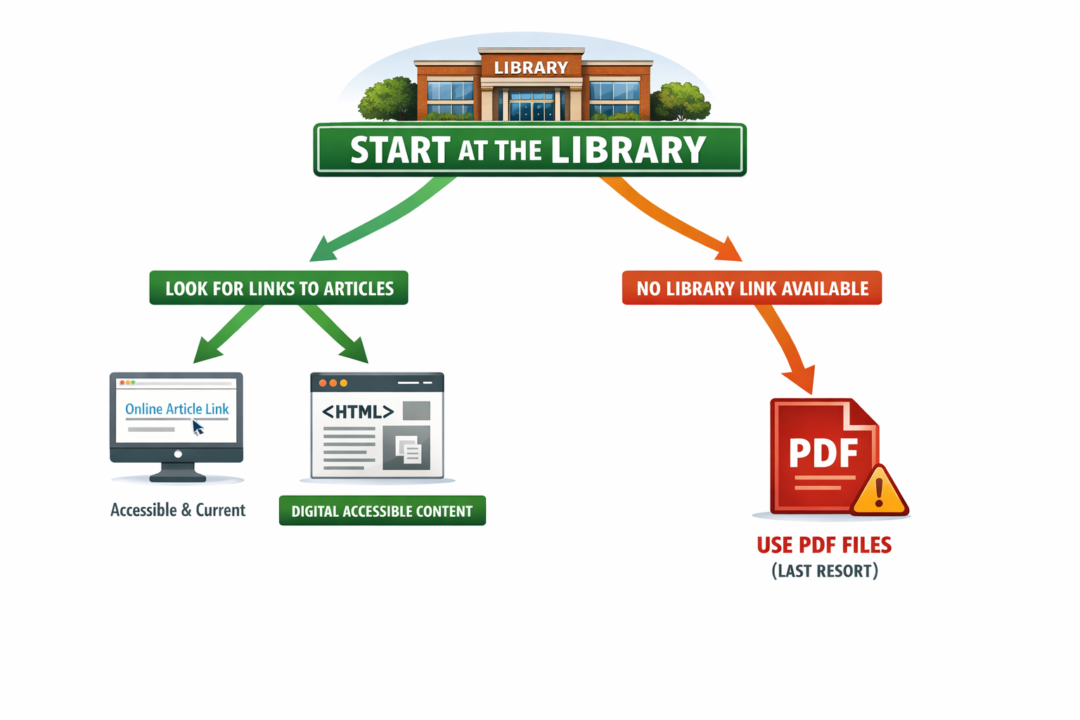
Academic libraries are the best place to start looking for course readings. Librarians can help you identify high-quality, current articles, open-access resources, and other digital content available through institutional subscriptions and thoughtful curation. For this reason, faculty may consider using stable library links instead of using PDF files. Many publishers provide full-text or HTLM versions of articles that can be read online and are more accessible for screen readers and assistive technologies. HTML is built using semantic markup (e.g., specific tags for headings <h1> to <h6>, paragraphs <p>, and lists) that provides an organized and logical structure for screen readers to interpret and navigate content efficiently. When we scan articles and turn them into PDFs, they become images that can be tagged, but improper or missing tags often disrupt the reading order or make the content unreadable for assistive technology.

Image full description: The flowchart above begins with a green library icon and the message “Start Your Search at the Library,” then splitting into two paths. The preferred left path (green) guides users to “Find Article Links,” leading to accessible online content such as HTML articles and full-text links, highlighted as “Digital & Accessible.” The right path (red) appears only when no link is available and directs users to use PDF files as a last resort, emphasizing the need to edit them for accessibility.
Searchable
HTML articles are properly formatted and linked to the full text, allowing students to search within the text, adjust display settings, use assistive tools, and activate any plug-in preferences. HTLM formats will also update over time as academic publishers work to achieve compliance with WCAG as well.
Recently, I was reading an article in the EBSCO database, and I noticed the toolbar across the top right of the page. In the toolbar, there are a headphone icon and an accessibility icon at the far right. The headphones allow users to listen to the article.

Image full description: The image shows a horizontal toolbar with a series of icons arranged side by side against a light gray background. From left to right, the icons include a bookmark symbol, a quotation mark, a camera with a plus sign, a curved arrow pointing right, a download symbol, a printer, a globe, a list with two lines, a set of headphones, and a circular icon with a person surrounded by a blue ring indicating accessibility options.
Accessibility Icon
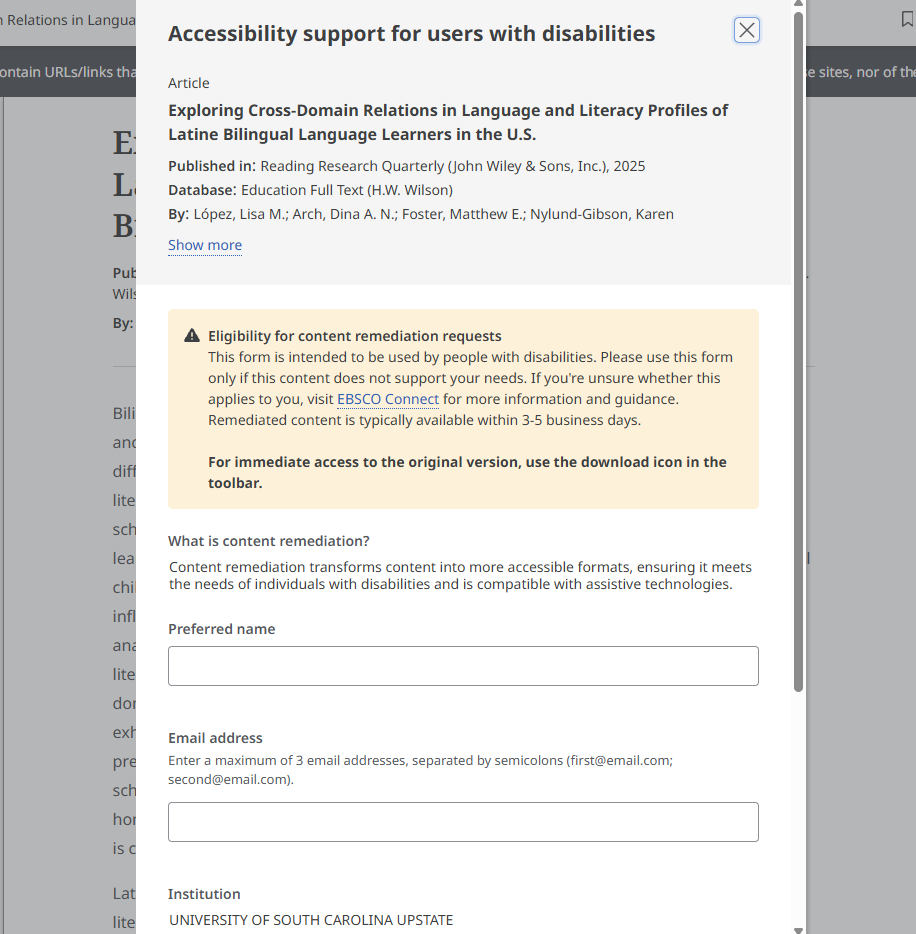
The accessibility icon, however, launches a form that allows users to request “content remediation.” According to the website, content remediation transforms content into more accessible formats, ensuring compliance with accessibility standards and compatibility with assistive technologies. Remediated content can be requested as a Word document or as HTLM and will be returned to the user in 3-5 days. I tried this out and was very glad to receive a more accessible version of the article a few days later.

Image full description: The Ebsco pop-up window titled “Accessibility support for users with disabilities” appears over a text-heavy webpage. The pop-up references an article titled “Exploring Cross-Domain Relations in Language and Literacy Profiles of Latine Bilingual Language Learners in the U.S.” A section marked with a triangle icon containing an exclamation point explains eligibility and how to request accessible content formats.
Use PDFs Sparingly
If an article cannot be linked through the library, PDF files may be necessary, but they really should be the exception, not the rule. Scanned PDF files often require significant remediation, such as OCR and tagging, to meet accessibility standards. When PDFs must be used, plan for additional time to ensure they are accessible.
If the PDF has simple formatting, you may be able to use Blackboard’s built-in “convert a file” document feature, which converts the selected file into the Blackboard Ultra Document format. Supported file types include PDF, PowerPoint (ppt, pptx, pps), and Word (doc, docx, odt). Be sure to review the converted content for accuracy.
Scanning book chapters and sharing them as PDF files is ideally a thing of the past and may violate copyright laws. If there are text materials you can’t find anything comparable to, work with the library to request access to ebooks or other resources. Visit the USC Upstate Copyright LibGuide to learn more about copyright and fair use in higher education.
Support
CAIFS also has several accessibility trainings coming up with Celena and Jennifer on Word documents and Adobe PDFs. The Word document presentation covers Word as well as Powerpoint, email, and video captioning. To sign up for those trainings, please review the Accessibility Matters Form and choose any this spring that work with your schedule.
You can also log into Blackboard and visit the CAIFS professional development course and explore the guidance on Word and Adobe if none of the training times work for you. Additionally, if you’d like assistance from the CAIFS accessibility team, please complete our Accessibility Assistance Form and we’ll reach out and set something up.
A Small Shift with a Big Impact
By starting at the library, prioritizing links, and choosing accessible digital formats, faculty can create courses that are easier to navigate, more inclusive, and more sustainable. And when PDFs are truly needed, support is available through CAIFS as you develop your accessibility skills and make your online and face to face course material more inviting and welcoming for all learners.
What Students Want
At the start of each semester, CAIFS hosts a very short and optional Blackboard Ultra Quick Start course for incoming students. The goal of the course is to invite students to explore the LMS and try out the discussion board, assignment submission, and Yuja video quiz so they have some level of familiarity and comfort with the learning environment before classes begin. The discussion board prompts students to discuss how comfortable they are with digital tools and to share some goals for the semester ahead and how they plan to achieve them. Of the students who engage with the course, almost all of them say they feel pretty comfortable with different digital tools, they want to establish and maintain a 3.5 GPA or higher, and they hope to meet some friends. These qualities and experiences that they hope for all contribute to and support student well-being and belonging. So what can we do to help students expand their tech skills, get the most from their courses and major, and find some friends?
Expanding 21st Century Tech Skills
Now that USC Upstate students have shared with us that they feel pretty comfortable with common tech tools, what can we do to increase their comfort with and use of 21st-century skills? One consideration is to embed technology use within authentic disciplinary tasks rather than treating technology as a standalone skill or course. We might ask students to use technology to analyze data, collaborate digitally, evaluate content and sources for accuracy, and communicate to different audiences across multiple platforms. Designing assignments that require students to select tools intentionally, document their decision-making, iterate based on peer and instructor feedback, and reflect on ethical considerations, like accessibility, data privacy, and AI use, can improve student motivation and engagement. It also invites students to build durable, transferable skills beyond specific tools or disciplines. If you’re interested in learning more about tech-integrated authentic assessment, explore Digital Authentic Assessments (DAA) in the article, Authentic Assessment in Higher Education: The Role of Digital Creative Technologies.
Nurturing Academic Persistence and Career Readiness
Faculty can also play a role in supporting students as they reach their academic and career readiness goals. Instructional practices that support persistence, like transparent assignments, scaffolded skill development, timely and actionable feedback, and opportunities to revise, build students’ confidence and sense of belonging, especially in 100 and 200 level general education courses. At the same time, students are interested in their career prospects and rely on faculty to make disciplinary skills explicit, to provide access to simulations or applied projects, and to guide them through the practice of communication, collaboration, and problem-solving like a historian, nurse, educator, or other professional. Small shifts in how we describe our assignments can make a huge impact: by naming the transferable skills, inviting students to reflect on how course learning connects to several careers, and aligning assessments with career-focused expectations, we can guide students toward achieving their academic and career goals. To learn more about integrating career readiness into your courses, reach out to Lillian Reeves (reeveslg@uscupstate.edu) to learn about how to access ACUE’s Quick Study course on that topic.
Finding Friends
While students have plenty of opportunities outside of class to meet people, they also spend a lot of time in class, which makes it the perfect place to meet a friend or two. Faculty can play a small, but powerful role in helping students meet their peers by designing classes that make connections feel natural. Small group work, low-stakes peer discussions in the early parts of the semester, and in-class collaborative projects with clearly defined roles can give students the repeated opportunities they need to get to know each other. When students have opportunities to speak and be listened to, community can emerge. To learn more about how to nurture the kinds of connections that lead to student success or to add some new strategies for building community to your practice, visit Elon’s Center for Engaged Learning and read the free copy of Peter Felten and Colleague’s book, Connections are everything: A college student’s guide to relationship-rich education.
Students come to college often full of hope and nerves. In recognition of both, we can listen to their aspirations and create opportunities for them to achieve their goals and make lasting connections with peers, faculty, and staff. Evidence across institutional size, rank, and geographic location in the United States has shown that relationships enrich the college experience and strengthen students’ sense of belonging immeasurably. In this way, fostering connections becomes a powerful – if often overlooked – dimension of student success.
5 Practices for Winter Well-Being
And just like that, Fall 2025 is drawing to a close. Over the past semester, you’ve published articles, presented at national and international conferences, completed—or begun—the ACUE Effective Teaching Certification, experimented with GenAI, made your courses more accessible, and shared your ideas and expertise with students and colleagues—all helping to make USC Upstate a more enduring, informed, and future-focused community. As you move into the winter holiday and reflect on your achievements and discoveries, here are 5 practices to support your winter well-being and rejuvenation.
Continue reading “5 Practices for Winter Well-Being”Introducing Achievements in Blackboard Ultra
If you’re looking for a fun, motivating way to boost student engagement, consider using the new Achievements feature in Blackboard Ultra. From the Achievements tab, faculty can create course achievement badges and set criteria for student success. While faculty can review which students have earned a course badge, students can also see the requirements for how to earn a badge and monitor their earned and unearned badges.
Continue reading “Introducing Achievements in Blackboard Ultra”Building Classroom Connections, One Name at a Time
Peter Felten recently gave a memorable workshop for USC Upstate’s Fall Faculty Day. In addition to being a kind, funny, and passionate student advocate, he left us with plenty to think about – and to act on – as we launch into the fall semester. Much of his research shows that small adjustments in faculty and staff interactions with students can make a huge impact. One such small adjustment may be learning our students’ names in the first few weeks of class. Learning and using students’ names builds trust and can help create a supportive and inviting classroom environment. It also forms the basis for how we can ensure every student experiences “genuine welcome and deep care. All students need to understand that they are valued as people.
Continue reading “Building Classroom Connections, One Name at a Time”