Blackboard Day 2026: Accessible Learning

Join us January 7, 2026 for our 7th Annual Blackboard Day

Register Now


9 am to 9:45 am

Welcome and Blackboard Learn Ultra Updates
Blackboard Learn Ultra Explore

Join the Blackboard Support Team to learn what is new in the Blackboard Learn Ultra Road Map for Spring-Fall 2026.

Look for new Grading settings and workflows, Automated Messages, Achievements, Competency-Based Mastery Learning, Release Conditions, and more!


10:00 am to 10:45 am

Streamlining Course Design with GenAI

Content Blocks and Knowledge Checks: Blackboard Learn Ultra Basics

Blackboard’s Artificial Intelligence Design Assist (ADA) offers easy-to-use course design tools enhanced by generative artificial intelligence and large language models. In this session, we will go over several key AI Design Assist tools for formatting modules and course pages (documents) and generating rubrics and knowledge checks. Plus, automate your content by using the human intelligence of the Learning Object Repository. Facilitator: Yamil Ernesto Ruiz, Director of Online Learning and Program Support


11:00 am to 11:45 am

Authentic and Career-Ready Assessments in Blackboard
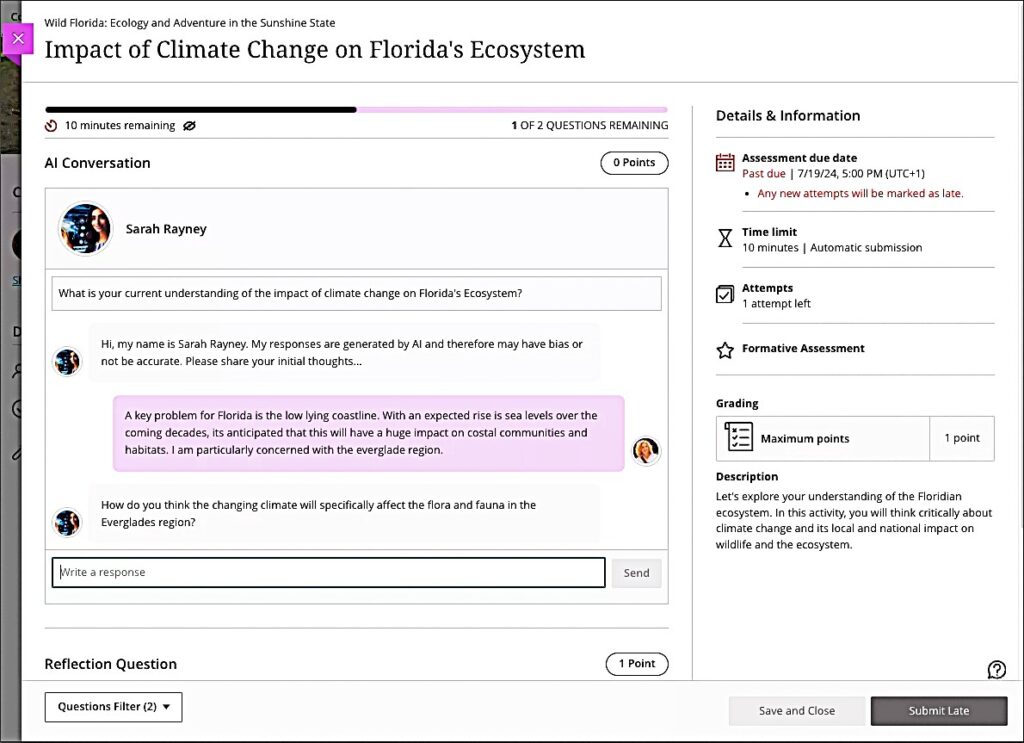
Screenshot of AI Conversation interface for students with image of the AI persona and examples of chat dialogue between student and AI persona

Both GenZ students and non-traditional learners crave relevance in their learning. Authentic and career-ready assessments can increase motivation and engagement while supporting Academic Integrity in the learning environment. Facilitator: Celena Kusch, Executive Director, Academic Innovation & Faculty Support.


12:00 pm to 1:00 pm

Lunch and ACUE Effective Teaching Practices Pinning Ceremony

Share a warming lunch and join the Association of College and University Educators (ACUE) in celebrating the achievements of USC Upstate faculty who have completed the Effective Teaching Practices program in the ACUE Pinning Ceremony. Facilitator: Lillian Reeves, Director of Transformative Pedagogy


1:00 pm to 1:30 pm

Using YuJa Lumina to Caption Videos
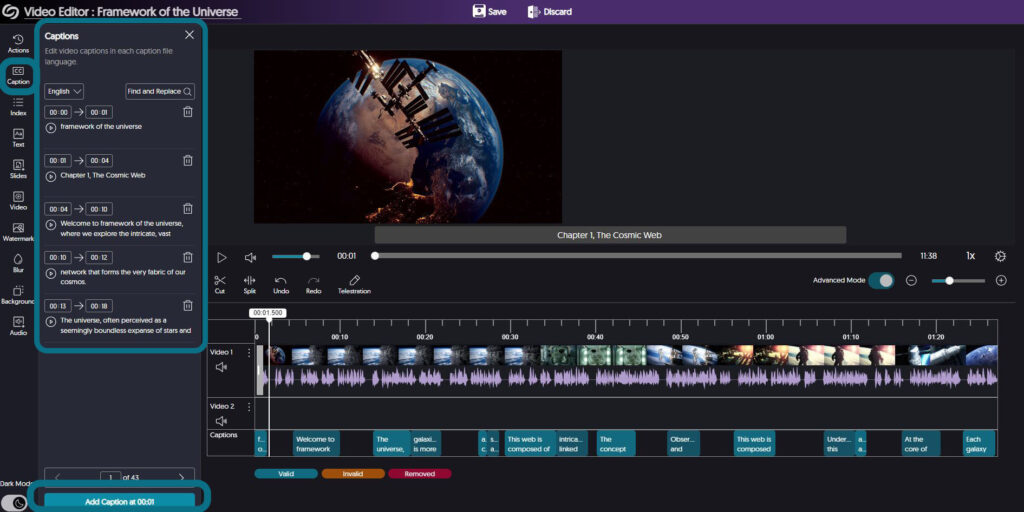
Screenshot of YuJa video editor showing captions panel for editing

High-quality, human-edited captions and audio descriptions form the bedrock of accessible video use. Learn more about YuJa’s advanced tools for ensuring your video content is accessible to all of your students. Facilitator: Diana Hernandez, YuJa


1:30 pm to 3:30 pm

Go for Green: Using Ally for Accessibility Guided Work Session
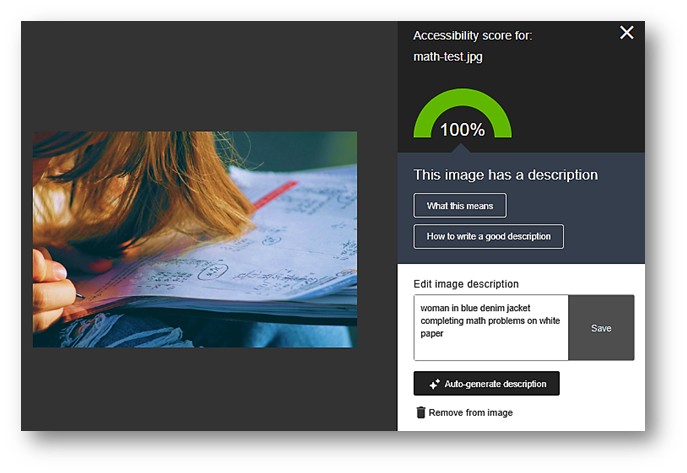
Screenshot of Ally Alt Text Generator in the Ally interface in Blackboard

In this hands-on work session, ask your questions, get pointers, and apply the Ally Accessibility tool to make your courses 100% accessible and meet the WCAG 2.1 AA federal accessibility standards for all instructional materials. Go for the Green in your Ally Accessibility Rating. Facilitator: Jennifer Bland, Learning Experience Coordinator


Blackboard Day 2025: Reaching Greater Heights with AI and Universal Design

Join us for our 5th Annual Blackboard Day in the College of Arts & Sciences Building, by accessing Zoom in the CAIFS PD Course, or by using the Zoom Link!

Register Now


9 am to 9:30 am

Welcome and Blackboard Learn Ultra Updates

Blackboard Learn Ultra ExploreJoin the Blackboard Support Team to learn what is new in the Blackboard Learn Ultra Road Map for Spring-Fall 2025.

Look for new release conditions, AI Debates, Achievements, Competency-Based Learning, and much more!


9:45 am to 10:30 am

Blackboard Learn Ultra Instructional Materials

Content Blocks and Knowledge Checks: Blackboard Learn Ultra BasicsLet’s dive into Ultra and learn our way around the updated content design options.  Use blocks to place media and text side-by-side. Or explore Knowledge Check features that can keep students engaged with course content. Facilitator: Jennifer Bland, Learning Experience Designer.


10:45 am to 11:30 am

Grading and Plagiarism Checking in Blackboard Learn Ultra

Gradebook Screenshot Blackboard Learn Ultra BasicsLooking for your Needs Grading list or how to drop the lowest quiz grade? In this session, we’ll get to know the Ultra Gradebook and where to find all the features you need. We’ll also explore a range of question analytics, plagiarism reports, and student support features for accommodations, extensions, and exemptions in the Ultra Gradebook. Facilitator: Celena Kusch, Executive Director, Academic Innovation & Faculty Support.

11:45 am to 12:30 pm

Using Activity Reports for Student Success

Activity Reports and Progress CheckingThis presentation will look at the Blackboard Ultra features, like progress checking and activity reports, that allow faculty to easily monitor student engagement and performance in real-time. By regularly reviewing student course participation and performance and communicating with students about how they’re doing, instructors have a strong opportunity to foster student success and persistence. Facilitator: Lillian Reeves, Director of Transformative and Inclusive Pedagogy.


12:30 pm to 1:15 pm

Lunch

Small chalkboard with the word BreakTake a break, and drop by CASB, Room 117, with your laptop for lunch, brainstorming and troubleshooting within your course.

Do you need a sandbox course for playing around in Blackboard Learn Ultra Course View? Email academicinnovation@uscupstate.edu.


1:15 pm to 2:00 pm

Course Design in a GenAI Learning Environment

Computer animated hand reaching out to a human hand reminiscent of Michelangelo's ceiling of the Sistine ChapelAnthology, Blackboard’s parent company, has partnered with Microsoft Artificial Intelligence (AI) to develop easy-to-use tools enhanced by generative artificial intelligence and large language models. In this session, we will go over several key AI Design Assist tools and AI-based assignment options. Facilitator: Yamil Ernesto Ruiz, Director of Online Learning and Program Support


2:15 pm to 3:00 pm

Let’s Talk Teaching: Blackboard Course Design Q&A

Join us for Let's Talk Teaching, a space for discussion, questions, and sharingShare your question, ideas, and course design dreams. How can the USC Upstate Syllabus Template help you streamline your course setup and conversion to a new term?

Blackboard Learn Ultra Launch with rocket heading upward

USC Upstate Blackboard Day 2024: Preparing for Transition to Blackboard Learn Ultra Courses

Join us for our 5th Annual Blackboard Day in the CLC Ballroom, by accessing Collaborate in the CAIFS PD Course, or by using the links below!

Register Now


9 am to 9:30 am

Welcome and Blackboard Learn Ultra Transition Updates

Blackboard Learn Ultra Launch with rocket heading upwardJoin Celena Kusch to hear about the latest updates in the Blackboard Learn Ultra Transition and new developments coming in Summer/Fall 2024. Discuss how changes to Anthology, Collaborate, and soon Zoom may make it easier for you to access the tools you need.

Join virtually via the CAIFS PD Course or the Morning Session Guest Link.


9:45 am to 10:30 am

Blackboard Learn Ultra Navigation Basics

Blackboard Learn Ultra Basics with screenshot of sample course content areaLet’s dive into Ultra and learn our way around the updated course view.  Discover where to find key features and settings so you can start to feel comfortable in a new course format.  We will also discuss how to create different types of assignments. Facilitator: Jennifer Bland, Learning Experience Designer.

Join via the CAIFS PD Course or the Morning Session Guest Link.


10:45 am to 11:25 pm

Transitioning Your Course from Original to Ultra: Steps for an Easy Course Conversion

Blackboard Learn Ultra Basics Original course view to Ultra course view screenshotsWhat happens after you click Ultra Course View Preview? Take a step-by-step tour of converting your original course into an Ultra student experience. We’ll discuss strategies for achieving a consistent, sequential, logical, and accessible course structure as you go. Facilitator: Celena Kusch, Executive Director, Academic Innovation & Faculty Support.

Join via the CAIFS PD Course or the Morning Session Guest Link.

11:35 am to 12:20 pm

Inclusive and Welcoming Blackboard Courses for All Students

Student interacting with a course on a smartphone and getting an idea (lightbulb overhead)In this session, we’ll think together about creating inclusive and welcoming Blackboard courses by exploring strategies that foster a sense of belonging for students, implementing accessible content, and using communications tools embedded in Blackboard. The goal is to ensure that all students feel supported and guided through their learning journey with Blackboard.

Facilitator: Lillian Reeves, Director of Transformative and Inclusive Pedagogy.

Join via the CAIFS PD Course or the Morning Session Guest Link.


12:30 pm to 1 pm

Lunch

Small chalkboard with the word BreakTake a break, and drop by the CLC Ballroom with your laptop for brainstorming and troubleshooting within your course.

Do you need a sandbox course for playing around in Blackboard Learn Ultra Course View? Email academicinnovation@uscupstate.edu.


1 pm to 2 pm

Concurrent Sessions

Computer animated hand reaching out to a human hand reminiscent of Michelangelo's ceiling of the Sistine Chapel
AI-Human Interaction

AI-Enhanced Courses with Blackboard Learn Ultra AI Design Assist

Anthology, Blackboard’s parent company, has partnered with Microsoft Artificial Intelligence (AI) to develop easy-to-use tools enhanced by generative artificial intelligence and large language models. In this session, we will go over several key AI Design Assist tools embedded in every Blackboard Ultra course to support you in creating assessments, rubrics and even discussion boards tied to different levels of Bloom’s Taxonomy. Facilitator: Yamil Ernesto Ruiz, Director of Online Learning and Program Support

Guest Link

Using the Gradebook in Blackboard Learn Ultra (CLC 309)

Looking for your Needs Grading list or how to drop the lowest quiz grade? In this session, we’ll get to know the Ultra Gradebook and where to find all the features you need. We’ll also explore a range of student activity and student support features for accommodations, extensions, and exemptions in the Ultra Gradebook. Facilitator: Celena Kusch, Executive Director, Center for Academic Innovation & Faculty Support

Guest Link


2:15 pm to 3:15 pm

Concurrent Sessions

Embedded Tools in Blackboard Ultra

In this session, we will discuss the tools within Blackboard that you and your students can access for free.  We will show how to embed YouTube videos, Padlets, Microsoft Forms, and Sway presentations, and how to use Perusall and VoiceThread activities for social learning and student-student interaction. Facilitator: Jennifer Bland, Learning Experience Designer

Join via the CAIFS PD Course or the Guest Link.

Remote students working on laptops in various settings while professor preps course writing on lightboard
High-Quality Online Courses

Preparing for Quality Matters Certification in your Online Course Design

Quality Matters (QM) is Upstate’s quality assurance process for ensuring that online courses are built with accessibility and our learners in mind. In this session, we will discuss concepts such as alignment, learning objectives, accessibility and more! Facilitator: Yamil Ernesto Ruiz, Director of Online Learning and Program Support

Join via the CAIFS PD Course or the Guest Link.


3:15 pm – 3:30 pm

Conclusion

Person with computer sitting on a stack of papers with red Xs and green checkmarks

AI and ChatGPT for Instructors

Person with computer sitting on a stack of papers with red Xs and green checkmarks

We’ve all heard the hype about Artificial Intelligence (AI) and ChatGPT. For some, this technology is a death knell for original writing, learning, critical thinking, and higher education itself. Others see it as the latest in a long line of transformational technologies for learning and knowledge production, like the typewriter, the calculator, the personal computer, and the Internet.

If we cut through the hype, we can find several ways to use generative AI tools in our roles as instructors. Generative AI can help us streamline our workload, enhance the resources we offer our students, and free up more of our time to build meaningful mentoring relationships with our students and engage in the original scholarship that fulfills our own intellectual curiosity.

ChatGPT and other Artificial Intelligence Language Models are great at one thing–producing text that fits the expectations of a given situation. Using AI to support your classroom communication can help you translate your expert knowledge (and vocabulary) into more novice-friendly terms. AI can provide you with what I’ll call “bridging” materials–guides, instructions, samples, templates, and related materials–that help your students connect the dots between where they are starting and where you need them to go.

AI can create “bridging” materials–guides, instructions, samples, templates–that help your students connect the dots between where they are starting and where you need them to go.

AI-Generated Bridges to Learning

1. Ask ChatGPT or an AI Outcomes Generator to general student-friendly course learning objectives or module learning objectives that use Bloom’s taxonomy and are based on standards in your discipline. You may not find it easy to think about your field from a novice lens anymore, but ChatGPT can.

2. Enter course lecture materials, a list of readings, or even a research question into ChatGPT or Taskade to generate a study guide, reading guide, or summary at a lower reading level than your original text. Use your AI-generated guide as an anchor to introduce your course unit so students know what to look for in the more complex materials you are about to share. The Texas A&M University LibGuide for AI-Based Literature Review Tools is a great place to start.

3. Ask ChatGPT to respond to one of your assignment prompts to generate a sample completed assignment, sample assignment template, or process outline students can use to guide their work.

4. Share the results of a model ChatGPT session to show sample prompts and questions students could ask to work through pre-writing, brainstorming, outlining, organizing ideas, or other processes or tasks on the way to producing a project or assignment. Any process-based guidance that you would work through patiently, one-on-one with students during office hours can be replicated (less expertly) by AI. And, all the students who need the one-on-one coaching at 1am will be able to get it at the time that is right for them.

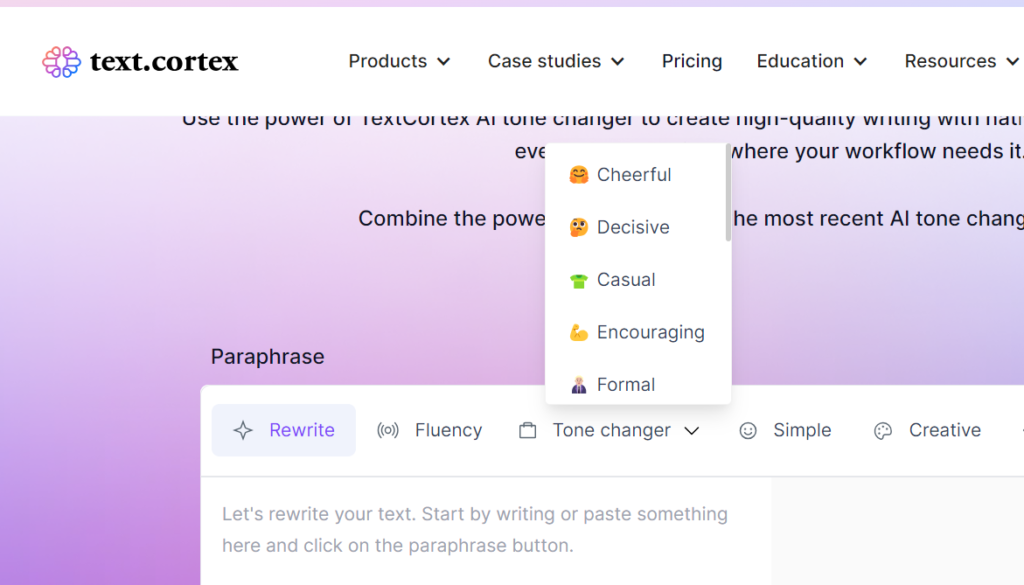
5. Use AI Tone Checkers or Tone Changers to refine or enhance the feedback you provide students on assignments or in emails. If you find yourself wondering why students do not listen to your feedback, try using a tone checker, like Sapling or Grammarly, to see how students may be hearing your words. Use ChatGPT or a dedicated tone changer to shift the tone from more formal and complex to more casual, simpler, or more encouraging. You can even dial up or down the level of the tone so your comments still feel authentically yours, just a little more student-centered.

Screenshot of Text.Cortex AI Tone Changer, showing options for a more cheerful, decisive, casual, encouraging, formal, simple, or creative tone.

6. Finally, if you know rubrics help students understand your expectations, but you hate writing them, use Taskade or ChatGPT to generate quick, effective rubrics for grading and feedback on assignments. Blackboard now includes a built-in AI-based rubric generator and other AI tools right inside your courses. Links to the Blackboard AI workshop and additional resources are available in the USC System KnowledgeBase Article.

Just as you would guide your students to use AI responsibly, you, too, will need to review the AI materials for accuracy, appropriateness, copyright, and citation, but AI can produce your draft in seconds, not hours. Letting your students know that these materials were generated with AI can also open the door to productive conversations about the ethical uses of AI in their own work.

No Learning Wasted: Prior Learning Credit and Equitable Transfer Practices

March 17, 9:30 am – 11:00 am, Virtual Meeting Link

Credit for Prior Learning is an essential strategy for supporting adult learners and transfer students. It is based on the premise that it doesn’t matter where learning occurs; what matters is what students know and what they can do.

USC Upstate recognizes a range of educational experiences and grants credit for prior learning: AP, CLEP, and similar exams; credit from military transcripts; workplace training experience recognized by the American Council on Education (ACE); credit by challenge exam for a USC Upstate course; credit by advanced standing (application for back credit); and credit by portfolio. USC Upstate also recognizes the completion of the general education requirements of an associate’s degree or bachelor’s degree at another accredited institution as fulfilling the general education requirements for a USC Upstate bachelor’s degree.

Learn how to navigate USC Upstate’s credit for prior learning policies and procedures and contribute to an accessible, affordable, and equitable education for all.

Can’t attend? Read more about Awarding Credit for Prior Learning and Institutional Best Practices. Explore the Council for Adult and Experiential Learning’s resources on “A Brighter Future through Credit for Prior Learning.”

The Implications of ChatGPT in Higher Education

March 22, 1:30 pm – 2:30 pm in the Arts and Sciences Building, Room 117

a human hand and robot hand with fingertips meeting in the post of Adam on the ceiling of the Sistine Chapel. Geometric design of glowing computer screens in the background.
Image by Gerd Altmann from Pixabay

The speed and power of ChatGPT to generate fluid text and synthesize information has taken higher education by surprise. Join this panel discussion of the implications of ChatGPT in higher education. Panelists include Dr. John Barnett, dean of the Library; Dr. Ron Fulbright, professor of information management and systems; Dr. Shuang Hundley, assistant professor of digital studies and mass media; and Tasha Thomas, senior instructor of English. 

Can’t attend? Check out “How Much Is Too Much? Drawing the Line on AI Assistance” by The Sentient Syllabus Project and “Artificial Intelligence: Friend, Foe, or Neither?” by the International Center for Academic Integrity.

Ryan Watkins’s article, “Update Your Course Syllabus for ChatGPT” includes several sample assignments that teach students to use ChatGPT responsible or highlight its limits. These also include assignments that have a non-AI and with-AI option in case not every student wants to or has the capability to create a ChatGPT account. Finally, don’t forget to check out the USC Upstate Syllabus template for suggested language about academic integrity.