Blackboard Day 2026: Accessible Learning

Join us January 7, 2026 for our 7th Annual Blackboard Day

Register Now


9 am to 9:45 am

Welcome and Blackboard Learn Ultra Updates
Blackboard Learn Ultra Explore

Join the Blackboard Support Team to learn what is new in the Blackboard Learn Ultra Road Map for Spring-Fall 2026.

Look for new Grading settings and workflows, Automated Messages, Achievements, Competency-Based Mastery Learning, Release Conditions, and more!


10:00 am to 10:45 am

Streamlining Course Design with GenAI

Content Blocks and Knowledge Checks: Blackboard Learn Ultra Basics

Blackboard’s Artificial Intelligence Design Assist (ADA) offers easy-to-use course design tools enhanced by generative artificial intelligence and large language models. In this session, we will go over several key AI Design Assist tools for formatting modules and course pages (documents) and generating rubrics and knowledge checks. Plus, automate your content by using the human intelligence of the Learning Object Repository. Facilitator: Yamil Ernesto Ruiz, Director of Online Learning and Program Support


11:00 am to 11:45 am

Authentic and Career-Ready Assessments in Blackboard
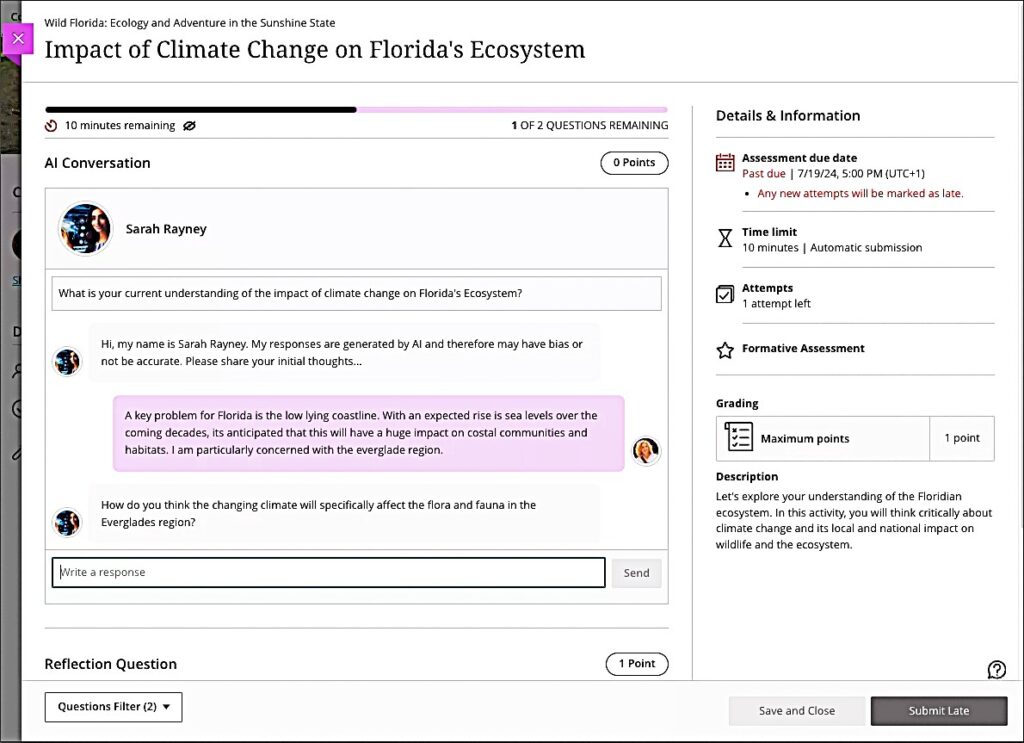
Screenshot of AI Conversation interface for students with image of the AI persona and examples of chat dialogue between student and AI persona

Both GenZ students and non-traditional learners crave relevance in their learning. Authentic and career-ready assessments can increase motivation and engagement while supporting Academic Integrity in the learning environment. Facilitator: Celena Kusch, Executive Director, Academic Innovation & Faculty Support.


12:00 pm to 1:00 pm

Lunch and ACUE Effective Teaching Practices Pinning Ceremony

Share a warming lunch and join the Association of College and University Educators (ACUE) in celebrating the achievements of USC Upstate faculty who have completed the Effective Teaching Practices program in the ACUE Pinning Ceremony. Facilitator: Lillian Reeves, Director of Transformative Pedagogy


1:00 pm to 1:30 pm

Using YuJa Lumina to Caption Videos
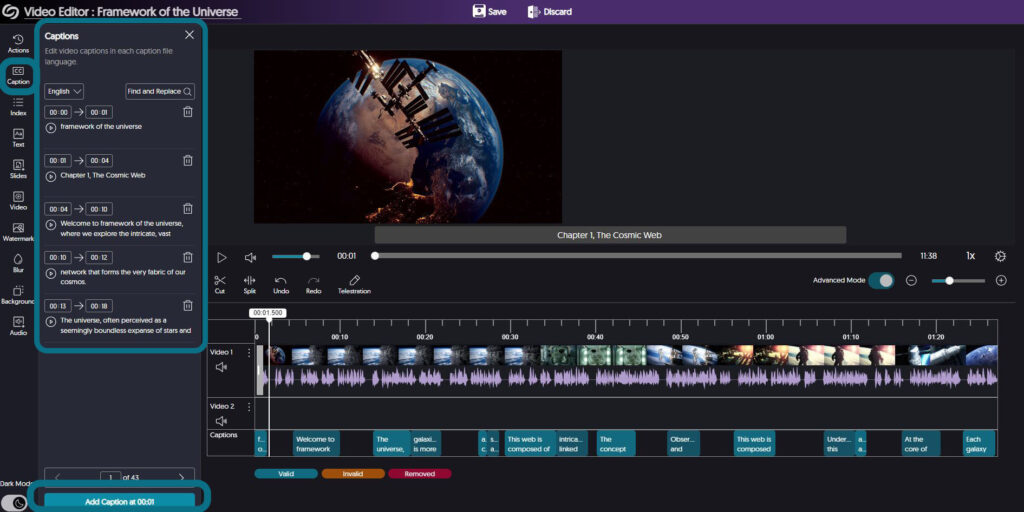
Screenshot of YuJa video editor showing captions panel for editing

High-quality, human-edited captions and audio descriptions form the bedrock of accessible video use. Learn more about YuJa’s advanced tools for ensuring your video content is accessible to all of your students. Facilitator: Diana Hernandez, YuJa


1:30 pm to 3:30 pm

Go for Green: Using Ally for Accessibility Guided Work Session
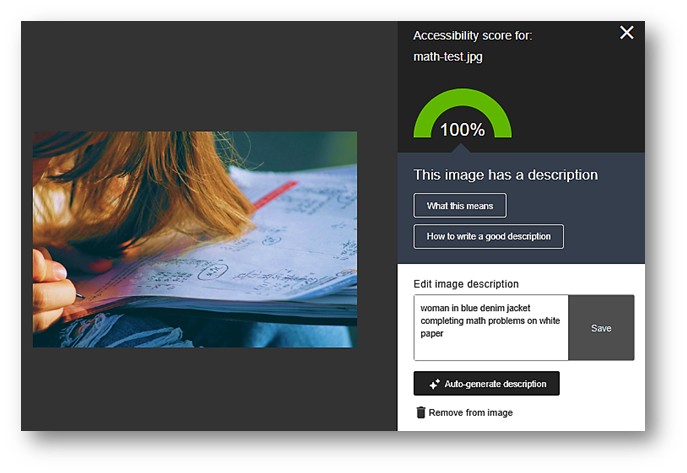
Screenshot of Ally Alt Text Generator in the Ally interface in Blackboard

In this hands-on work session, ask your questions, get pointers, and apply the Ally Accessibility tool to make your courses 100% accessible and meet the WCAG 2.1 AA federal accessibility standards for all instructional materials. Go for the Green in your Ally Accessibility Rating. Facilitator: Jennifer Bland, Learning Experience Coordinator

Image of a person studying at a computer and highlighting paper documents.

Effective Strategies for Maymester and Summer Course Preparation

As the end of spring semester approaches, many faculty begin turning their attention to preparing for Maymester or the summer sessions. Converting 15 week courses into 8 week or 4 week format, however, presents a unique challenge. How can faculty nurture student understanding and provide meaningful feedback at such an accelerated pace? 

Continue reading “Effective Strategies for Maymester and Summer Course Preparation”
accessibility symbols for hearing, vision, audio, physical, etc.

Responding to Ally Accessibility Scores in Your Courses

The USC Upstate Accessibility Commitment aims to ensure students, faculty, and staff have access to all spaces and materials where learning takes place. Luckily, Blackboard Ultra has made faculty’s role in fulling this commitment easier than ever. The university-adopted quality assurance program holds all courses to a high standard of accessibility, including expectations that all documents use heading style formats, color contrast, and accessible tables; that videos have accurate closed captions; and that audio files or recordings have transcripts to ensure barrier-free learning opportunities for all students. It may sound like a lot of work to manage and create accessible content, but all of our content tools, from Adobe to Word to Blackboard Ultra, have embedded checks and remedies to help us achieve our accessibility goals. Let’s get started!

Continue reading “Responding to Ally Accessibility Scores in Your Courses”

A Student-Centered Approach to Communication

A recent Pathify study reported the average click rate of emails in higher ed is less than 7%, even though email is the primary mode many institutions use to communicate important information to faculty, staff, and students. Right before the Pandemic, I also discovered that student responses to my emails had noticeably declined.  More students were missing programmatic and institutional events and due dates and since then, the trend has become even more pronounced. 

Continue reading “A Student-Centered Approach to Communication”
Blackboard Learn Ultra Launch with rocket heading upward

USC Upstate Blackboard Day 2024: Preparing for Transition to Blackboard Learn Ultra Courses

Join us for our 5th Annual Blackboard Day in the CLC Ballroom, by accessing Collaborate in the CAIFS PD Course, or by using the links below!

Register Now


9 am to 9:30 am

Welcome and Blackboard Learn Ultra Transition Updates

Blackboard Learn Ultra Launch with rocket heading upwardJoin Celena Kusch to hear about the latest updates in the Blackboard Learn Ultra Transition and new developments coming in Summer/Fall 2024. Discuss how changes to Anthology, Collaborate, and soon Zoom may make it easier for you to access the tools you need.

Join virtually via the CAIFS PD Course or the Morning Session Guest Link.


9:45 am to 10:30 am

Blackboard Learn Ultra Navigation Basics

Blackboard Learn Ultra Basics with screenshot of sample course content areaLet’s dive into Ultra and learn our way around the updated course view.  Discover where to find key features and settings so you can start to feel comfortable in a new course format.  We will also discuss how to create different types of assignments. Facilitator: Jennifer Bland, Learning Experience Designer.

Join via the CAIFS PD Course or the Morning Session Guest Link.


10:45 am to 11:25 pm

Transitioning Your Course from Original to Ultra: Steps for an Easy Course Conversion

Blackboard Learn Ultra Basics Original course view to Ultra course view screenshotsWhat happens after you click Ultra Course View Preview? Take a step-by-step tour of converting your original course into an Ultra student experience. We’ll discuss strategies for achieving a consistent, sequential, logical, and accessible course structure as you go. Facilitator: Celena Kusch, Executive Director, Academic Innovation & Faculty Support.

Join via the CAIFS PD Course or the Morning Session Guest Link.

11:35 am to 12:20 pm

Inclusive and Welcoming Blackboard Courses for All Students

Student interacting with a course on a smartphone and getting an idea (lightbulb overhead)In this session, we’ll think together about creating inclusive and welcoming Blackboard courses by exploring strategies that foster a sense of belonging for students, implementing accessible content, and using communications tools embedded in Blackboard. The goal is to ensure that all students feel supported and guided through their learning journey with Blackboard.

Facilitator: Lillian Reeves, Director of Transformative and Inclusive Pedagogy.

Join via the CAIFS PD Course or the Morning Session Guest Link.


12:30 pm to 1 pm

Lunch

Small chalkboard with the word BreakTake a break, and drop by the CLC Ballroom with your laptop for brainstorming and troubleshooting within your course.

Do you need a sandbox course for playing around in Blackboard Learn Ultra Course View? Email academicinnovation@uscupstate.edu.


1 pm to 2 pm

Concurrent Sessions

Computer animated hand reaching out to a human hand reminiscent of Michelangelo's ceiling of the Sistine Chapel
AI-Human Interaction

AI-Enhanced Courses with Blackboard Learn Ultra AI Design Assist

Anthology, Blackboard’s parent company, has partnered with Microsoft Artificial Intelligence (AI) to develop easy-to-use tools enhanced by generative artificial intelligence and large language models. In this session, we will go over several key AI Design Assist tools embedded in every Blackboard Ultra course to support you in creating assessments, rubrics and even discussion boards tied to different levels of Bloom’s Taxonomy. Facilitator: Yamil Ernesto Ruiz, Director of Online Learning and Program Support

Guest Link

Using the Gradebook in Blackboard Learn Ultra (CLC 309)

Looking for your Needs Grading list or how to drop the lowest quiz grade? In this session, we’ll get to know the Ultra Gradebook and where to find all the features you need. We’ll also explore a range of student activity and student support features for accommodations, extensions, and exemptions in the Ultra Gradebook. Facilitator: Celena Kusch, Executive Director, Center for Academic Innovation & Faculty Support

Guest Link


2:15 pm to 3:15 pm

Concurrent Sessions

Embedded Tools in Blackboard Ultra

In this session, we will discuss the tools within Blackboard that you and your students can access for free.  We will show how to embed YouTube videos, Padlets, Microsoft Forms, and Sway presentations, and how to use Perusall and VoiceThread activities for social learning and student-student interaction. Facilitator: Jennifer Bland, Learning Experience Designer

Join via the CAIFS PD Course or the Guest Link.

Remote students working on laptops in various settings while professor preps course writing on lightboard
High-Quality Online Courses

Preparing for Quality Matters Certification in your Online Course Design

Quality Matters (QM) is Upstate’s quality assurance process for ensuring that online courses are built with accessibility and our learners in mind. In this session, we will discuss concepts such as alignment, learning objectives, accessibility and more! Facilitator: Yamil Ernesto Ruiz, Director of Online Learning and Program Support

Join via the CAIFS PD Course or the Guest Link.


3:15 pm – 3:30 pm

Conclusion

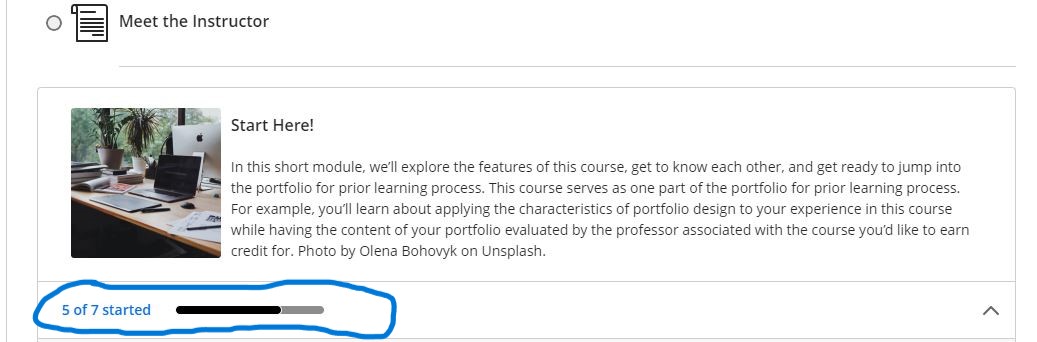
Screenshot of a module showing how much of a module is complete

Making the Case for Modules

Are we ready for modules?  

 Yes! And there is no better time to switch to modules from nested folders. In Blackboard Original, faculty were able to use the folder system just like the content containers on our computers. A file for P and T: files for service, teaching, scholarship; and within scholarship an articles folder; and in that folder works published for 2021, 2022, 2023; articles in the works that didn’t get published yet; and within that folder, proposals for any number of my million dollar ideas… anyone else have one of those? By the time we’ve gotten to the million dollar idea folder, we are eight folders deep in clicking and scanning. 

Continue reading “Making the Case for Modules”