
The TIP Blog is excited to kick off the 2024-2025 academic year celebrating the outstanding achievements of our faculty members who have recently been honored with excellence in teaching, research, and service awards. These educators have demonstrated an exceptional commitment to student success, innovative teaching methods, and passion for their subjects. Join us in congratulating them on their well-deserved recognitions. Please also join us on Wednesday, August 28th from 12:45-1:45PM in Admin 202 for a lunch (provided) and learn panel to hear more about practical insights on planning, designing, and delivering course content that have proven highly effective in their classrooms.
Continue reading “Faculty Awards 2023-2024”
Navigating the Future of Learning with Gen AI
As Gen AI (GAI) tools proliferated across the globe during the last few semesters, did you find yourself panicked, excited, or feeling a bit of both? Were you overwhelmed by the implications for academic integrity or overcome by a sense of wonder at the boundless potential to innovate our teaching, learning, and research? Your reactions are likely to guide your AI Use policies in your classrooms. Here’s how to communicate your expectations clearly to your students.
Continue reading “Navigating the Future of Learning with Gen AI”
Responding to Ally Accessibility Scores in Your Courses
The USC Upstate Accessibility Commitment aims to ensure students, faculty, and staff have access to all spaces and materials where learning takes place. Luckily, Blackboard Ultra has made faculty’s role in fulling this commitment easier than ever. The university-adopted quality assurance program holds all courses to a high standard of accessibility, including expectations that all documents use heading style formats, color contrast, and accessible tables; that videos have accurate closed captions; and that audio files or recordings have transcripts to ensure barrier-free learning opportunities for all students. It may sound like a lot of work to manage and create accessible content, but all of our content tools, from Adobe to Word to Blackboard Ultra, have embedded checks and remedies to help us achieve our accessibility goals. Let’s get started!
Continue reading “Responding to Ally Accessibility Scores in Your Courses”Summer CV Refresh
As you’re basking in the summer sun or working on your summer teaching or research, make time to update your CV and accompanying materials. The CV is often a summary or a snapshot of all your academic achievements and in the life of a faculty member, a lot can change in a year. If you’re in the first part of your career, your CV might focus on your doctoral research, any publications or submitted scholarly work, courses you taught as a TA or adjunct before joining the faculty, conferences you’ve attended, and service you’ve completed.
Continue reading “Summer CV Refresh”Getting the Most from Your Learning Evaluation Survey Data
As the semester closes out and we move into summer, I like to set aside some time to wade into the student learning evaluations for my classes. Despite the efforts to make student learning meaningful and enduring each semester, I still find myself filled with a certain familiar sense of angst as I click the reports and dig in. I wonder if they got what they needed from my courses, if I could have done more or taught differently, or if they had big moments of discovery and affirmation.
Continue reading “Getting the Most from Your Learning Evaluation Survey Data”A Quick Guide on How to Write Professional Emails: Student Edition
Email is the information currency of the professional world, and the number one way professional people communicate. Focus on the subject line, greeting, body of the email, and signature to demonstrate professionalism in your email communication.
Subject Line

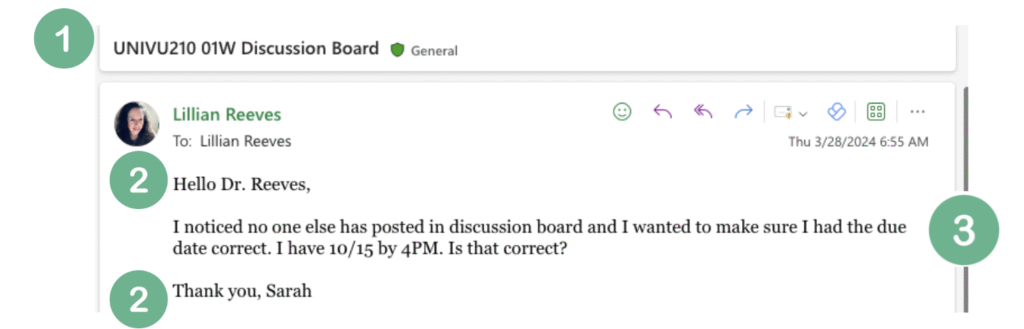
When emailing faculty, include a brief description of what the email is regarding and the course and section number. This info can be found at the top of the Blackboard page.
Example: UNIVU210-01W Discussion Board.
Professional Address

Address your instructor (or employer) in the opening line, then sign your name at the end of the email. By addressing the person you’re emailing in the way they prefer to be addressed, you help them focus on your request.
Example Greeting: Dear Dr. Smith or Prof. Smith,
Example Signature: Thank you, Sarah Jones
Body of the Email
Share your questions or other content in 3-5 clear sentences. If you cannot express your needs in that space, consider visiting office hours or setting up a virtual meeting.
Example: Dear Dr. Smith, I noticed no one else has posted in the discussion board and I wanted to make sure I had the due date correct. I have 10/15 by 4pm. Is that correct? Thank you, Sarah Jones

Before You Hit Send

- Know that you are writing to someone who will answer your questions, who is willing to help you, and who wants to see you succeed.
- Know that your questions and confusion are valid and you can ask them without embarrassment.
- Practice using a neutral, professional tone.
- Review your email for grammar, spelling, and clarity.
Anatomy of a Professional Email