Students walking around an imaginary college landscape with buildings, books, and larger-than-life computers.

AI Spark Tips: Personalize Student Coaching with AI

ContactNord’s AI Tutor Pro offers students opportunities to chat with AI to either check their knowledge and skills or deepen their knowledge on a topic. Students select their learning level (e.g., undergraduate or graduate), level of difficulty (introductory through advanced), their preferred language, and the topic or content they wish to explore.

AI Tutor Pro follows guidelines for coaching learners, not providing them answers, so instructors can trust that this interface will not write a paper for a student.

Bonus: At the end of their AI tutoring session, students can download their chat transcript and turn it in as an assignment in your course. Ask learners to add a reflection about the AI’s accuracy and/or bias to prompt students to think critically about the strengths and limitations of AI.

Learn More at AI Tutor Pro.
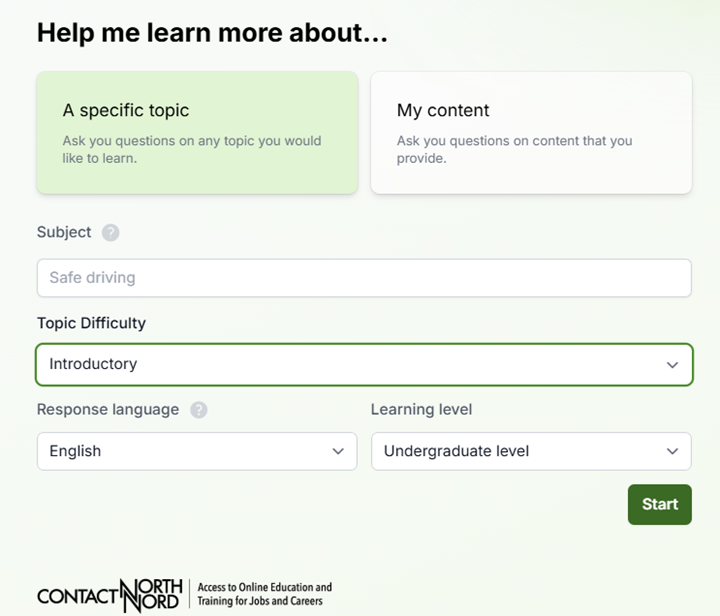
Screenshot of AI Tutor Pro by Contact Nord. Chat asks learners to "Help me learn more about...."
Image of a person studying at a computer and highlighting paper documents.

Effective Strategies for Maymester and Summer Course Preparation

As the end of spring semester approaches, many faculty begin turning their attention to preparing for Maymester or the summer sessions. Converting 15 week courses into 8 week or 4 week format, however, presents a unique challenge. How can faculty nurture student understanding and provide meaningful feedback at such an accelerated pace? 

Continue reading “Effective Strategies for Maymester and Summer Course Preparation”
Students walking around an imaginary college landscape with buildings, books, and larger-than-life computers.

AI Spark Tips: AI Conversations for Students

Guide students to prepare for interviews, debates, or meetings with marketing clients, patients in healthcare settings, or other professionals in your discipline using artificial intelligence. The AI Conversation tool, built into your Blackboard course, enables students to work with AI in a controlled environment. You set the topic, you define the conversation persona, select Role Play and read a record of your students’ chat.

Bonus: Your persona may be instructed to speak in languages other than English, and you may give them location-specific backgrounds to support learning in world language courses.

At the end of their chat, students respond to a reflection question you design to help them apply critical thinking and ethics to their AI use.

Learn More at Blackboard.