Students walking around an imaginary college landscape with buildings, books, and larger-than-life computers.

AI Spark Tips: The New World of AI Tutoring

In recent months, a range of journal and news articles featuring Harvard’s AI Tutors have touted the effectiveness of AI tutorbots in fields like physics, accounting, and statistics. Harvard’s AI tutor studies have found that students achieve greater academic success and engagement with personal tutorbots that can generate practice problems and questions or coach students through cases and scenarios from disciplinary or real-world perspectives.

Instructors who would like to take advantage of the benefits of AI tutors (without the time-consuming work of building, training, and testing their own bots) can turn to a range of sources for ready-to-launch AI tutors for students.

General Tutors Students Can Access

  • AI Tutor Pro by Contact Nord is our favorite tutorbot. It has three modes: grow knowledge, check knowledge, and discuss knowledge. Students can identify their subject and academic level and enjoy prompting and questioning from the AI tutor in one of eight common languages. At the end of the chat, students may opt to receive a summary of their strengths and areas for further study.
  • ChatGPT.Edu has launched its Study Mode for a built-in tutoring support. Login to ChatGPT.Edu with your USC Upstate single sign on through the Spartan Hub to access your protected, full ChatGPT account. In the chat prompt type “Turn on Study Mode,” and ChatGPT Study Mode will coach students to work through problems step-by-step rather than giving out complete answers.

Custom Tutors Instructors Can Build

For instructors who make a free account, AI Faculty Assistant for AI Tutor Pro allows instructors to create their own custom AI tutor trained on OpenStax textbook materials or faculty materials you load into the AI on your own (See AI Faculty Assistant Privacy Policy). Instructors generate a private link to their custom tutor, which can be shared with students in their course.

The AI Conversation assignment tool in Blackboard can also be used to create focused tutoring or coaching experiences at key points in the term. Set up your AI Conversation with a tutoring role play scenario targeting a specific learning experience for your course.

  • Design your AI persona as a peer tutor with experience in the detailed course topics you are covering. Or create an academic coach with expertise in study skills and metacognition or a supportive graduate teaching assistant in your discipline who challenges students to expand and develop their ideas.
  • Although instructors cannot upload content into the AI at this time, they can encourage tutoring about the learning process needed to study the course content. Invite students to work with the AI persona to draft a paper thesis or outline, develop study skills for an upcoming test, plan a project, or strategize a group assignment.

Google’s NotebookLM now offers a Learning Guide mode that enables instructors to upload or link to relevant materials, create audio or video resources and mindmaps, then share their notebook link with students as a Learning Guide. Students can listen to a podcast-style discussion of course materials, explore flashcards and quizzes, or chat with a tutorbot designed to coach them through ideas step-by-step. NotebookLM has a free plan for individuals, but added features require premium subscriptions.
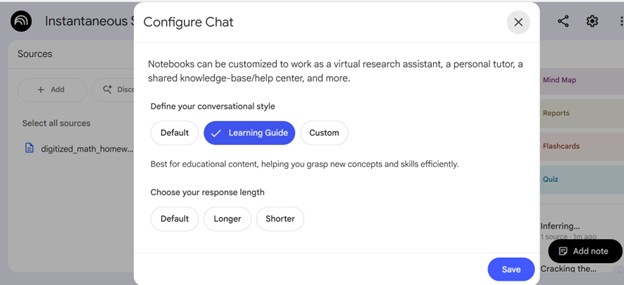
NotebookLM chat options, with Learning Guide selected

AI Tutors from Publishers and Library Databases

Many textbook publishers and research databases offer their own AI tutoring and guidance within ebook or database sites.

For textbooks, Pearson, McGraw Hill, Macmillan, and VitalSource all offer coaching or tutoring AI bots embedded in a growing list of their ebooks. Students can see an AI icon while reading their textbook to start a practice session or quiz themselves on what they read.

Library databases such as JSTOR and Proquest offer AI assistants to coach students through the research process. The AI research assistants can suggest additional search terms and offer lists of concepts in selected articles or chapters from ebooks in the library collection. In the coming months even more library platforms and databases will be integrating AI assistants to enable natural language searching and to help streamline research for students.

Bonus Tip

Listen to a Harvard University faculty member describe their AI Tutor prompts in the YouTube video below.

Students walking around an imaginary college landscape with buildings, books, and larger-than-life computers.

AI Spark Tips: Custom Instructions for Responsive Chats

masked superhero seated in a school desk working on a laptop. AI-Generated Image

In the world of AI, context matters. A prompt that begins “I am a university professor teaching an undergraduate course…” will produce a completely different result than a prompt for a teenage superhero attempting to balance coursework with saving the world (AI-Generated Image).

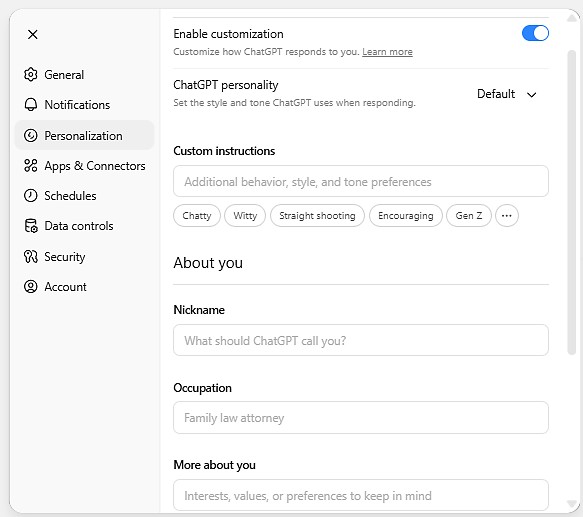
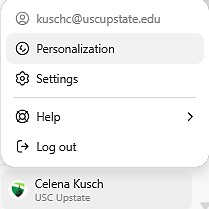
If you find yourself repeatedly reminding ChatGPT.edu about your context or your response preferences, Custom Instructions may be a great solution for you. You can find Custom Instructions under the Personalization settings in your ChatGPT.edu account.

Screenshot of ChatGPT.edu account settings, showing personalization, settings, help and log out.

To customize your chat experience, you may wish to focus on two main areas of personalization: Custom instructions and More about you.

Custom instructions can guide the format, tone, and behavior patterns in chat responses, while More about you provides helpful context, interests, and perspectives you want the chat to prioritize in its responses.

Screenshot of Personalization menu in ChatGPT.edu, including Enable customization, ChatGPT personality, Custom Instructions, About You: Nickname, occupation, and More about you.

Custom Instructions Examples

As you write your custom instructions, consider your distinct preferences:

  • Do you usually want AI to summarize or shorten content? Do you want a list of bullet points with citations and links? Or do you want a thorough discussion in paragraph format for you to edit and streamline yourself?
  • What voice would you like AI to use? Academic, formal, business-like, friendly, constructively critical, or in the USC Upstate brand style? Tailoring AI’s voice to the style of the output you want it to produce can save you time editing later.
  • What behaviors do you want AI to start or stop? Do you usually want AI to produce sample content in a spreadsheet format or a Word document? Do you want AI to always pay attention to accessibility standards for headings in the documents it creates for you? Do you want it to skip its self-summary or refrain from reminding you that it is not a human? What behaviors can help you get the content you want faster and more efficiently?
  • What details about your professional responsibilities and background experience should AI take into consideration? Are you a university instructor who primarily teaches introductory college courses with a focus on relevant real-world applications that can build students career skills? Do you teach advanced, research-focused courses where you like to introduce students to the current disciplinary debates in your field? Let ChatGPT take those preferences into account.

Here’s a sample for a instructor who teaches primarily online business courses:

Custom Instructions: Write in a professional but approachable academic tone. When creating instructional materials or assessments, ensure they are suitable for an asynchronous online learning environment and reflect sound educational design (e.g., measurable verbs, logical scaffolding, student-centered language). Whenever possible, tie in relevant case studies or scenarios that illustrate course content in business contexts.

More about you: I teach undergraduate and graduate business students online. My interests include instructional design, online pedagogy, and assurance of learning. I aim to make my courses engaging, outcome-driven, and relevant to real-world business practice. I value clear alignment among objectives, activities, and assessments.

Bonus Tip

If you wish to engage in a chat from a different perspective or with different preferences, just return to your personalization settings and toggle off “Enable customization.” Toggle customization back on when you are ready to return to your usual instructions.

You may also create multiple, labeled roles in the custom instructions, then signal which role you’d like AI to apply in a given chat by starting with “Adopt Role 1.”

Read more about ChatGPT Custom Instructions.

Students walking around an imaginary college landscape with buildings, books, and larger-than-life computers.

AI Spark Tips: Coaching Students for Ethical AI Use

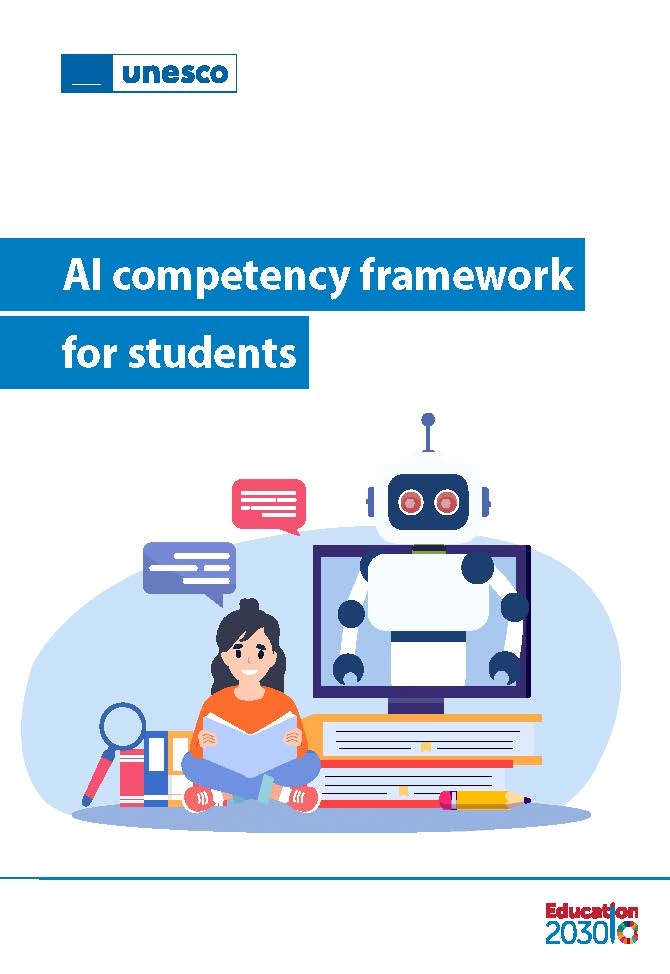
The UNESCO AI Competency Framework for Students stresses the importance of AI ethics and a human-centered mindset. As educators, our goal is to guide students in their progress from novice to expert. Helping students develop responsible and effective AI prompting techniques can be an important part of their learning journey.

Cover of the UNESCO AI Competency Framework for Students

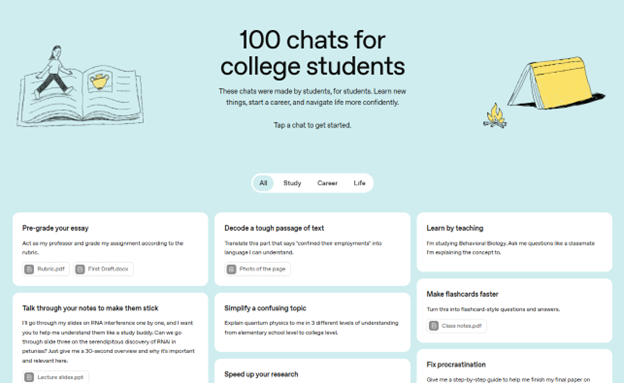
100 Chats for College Students

Task-based AI prompts can be a real leveler for students who complete their work after hours when it is not possible to meet with instructors in office hours. Templates for chat prompts can keep students learning ethically with support from AI.

100 chats for college students screenshot
ChatGPT’s 100 Chats for College Students

Some great examples of learning-forward chat prompts on the 100 chats list include the following:

  • I’m studying Behavioral Biology. Ask me questions like a classmate I’m explaining the concept to.
  • Guide me by asking open-ended questions to encourage reflection, critical thinking, and application of knowledge. Do not lecture or list facts unless I request clarification. Begin by asking me about the notes I uploaded. [Attach documents]
  • Give me a step-by-step guide to help me finish an 8-page research paper about the sociology of cities. Make the steps as small and achievable as possible. My paper is due in 10 days.

Bonus Tip

Blackboard’s AI Conversation assignment can provide a guided path for students to accomplish a specific task using AI. Set up the AI Conversation persona to be a peer tutor, an academic success coach, a career center advisor, or a virtual teaching assistant for your course with graduate credentials and a supportive attitude. Give the AI persona instructions for the kinds of answers they will provide (e.g. always end with a question, base answers on evidence-based advice related to study skills, etc.). Then, set up the scenario you’d like your students to engage with AI.

Find out more about AI Conversations Role Play.

Two people at a table talking over a laptop screen.

Detection, Dialogue, and Innovation in Classroom Uses of AI 

Despite the relative newness of AI tools for all, surveys conducted by the Digital Education Council, Chegg, and TechTrends found that more than 80% of students have already built AI into their learning lives. According to the survey results, students are using tools like ChatGPT, Grammarly, and CoPilot primarily to search for information, check grammar and improve their writing, summarize and paraphrase documents, create first drafts, explain complex concepts, and suggest research projects.

While these efforts provide students with several benefits, students remain skeptical of AI’s accuracy. Chegg’s survey found that 53% of students were concerned about content reliability and the ethical implications of using the tools. They also were worried about data privacy and whether or not using AI tools diminished their ability to think critically. As we all continue to navigate AI’s uses in higher ed, having a plan for AI use and talking candidly with students about your expectations and theirs, may reduce some of the uncertainty everyone has about when and where to use AI.  

Continue reading “Detection, Dialogue, and Innovation in Classroom Uses of AI “