Join the Blackboard Support Team to learn what is new in the Blackboard Learn Ultra Road Map for Spring-Fall 2027.
Look for new AI Pulse Quiz Conversations, Gradebook upgrades, updated Content Editor, enhanced Groups and Rubric features, and more! Facilitator: Eric Gudmundson, Senior Manager, Blackboard LMS Solutions Engineering Team
10:00 am to 10:45 am
Blackboard and AI: Designing Ethical Foundations for Learning
How can we help students develop essential ethical foundations for AI use without taking time away from the content and competencies at the heart of our courses? This hands-on session introduces a four-week framework for creating AI-aware assignments that integrate AI literacy while keeping course learning outcomes front and center. Explore practical strategies for setting clear expectations for AI use and engaging thoughtfully with AI personas in Blackboard to build academic integrity. Facilitator: Dr. Celena Kusch, Executive Director, Academic Innovation & Faculty Support.
10:45 am to 11:30 am
Assessing What Matters in the Age of AI
As artificial intelligence reshapes higher education, how can faculty ensure that assessments continue to measure meaningful student learning? This session explores how AI challenges traditional approaches to assessment and invites faculty to reconsider what students need to know, demonstrate, and accomplish. Participants will reflect on strategies for designing meaningful assessments that emphasize critical thinking, disciplinary knowledge, and authentic learning in an AI-enabled world. Facilitator: Dr. Jonathan Clemens, Professional Learning and Development, Risepoint. Dr. Clemens earned his Ph.D. in the history of science and technology from the University of Minnesota-Twin Cities and presents regularly on the impact of AI in higher education and instructional design.
11:30 am to 12:30 pm
Lunch and ACUE Effective Teaching Practices Pinning Ceremony and Presentation of High-Quality Online Teaching Certificates
Join us for lunch, sponsored by Blackboard, and celebrate the achievements of USC Upstate faculty who have completed the Association of College and University Educators (ACUE) Effective Teaching Practices program and the USC Upstate High-Quality Online Course Design Program. Facilitator: Dr. Lillian Reeves, Director of Transformative Pedagogy
12:30 pm to 1:15 pm
Blackboard for Course Delivery
Great course design can set up your students for success, but great course delivery requires ongoing announcements, reminders, and small gestures that build connections between students and instructors. Explore the pillars of great course delivery and the Blackboard tools that can streamline and support your instructional practice. Facilitator: Dr. Yamil Ruiz, Director of Online Learning and Program Support
1:30 pm to 2:15 pm
Go for Green: Using the Latest Ally Features to Create Accessible Courses
In this session, learn about the latest developments and new features coming to Ally in 2027–including adding alt text to images within PDFs, auto-tagging PDFs, and more! Ask your accessibility questions, get pointers, and apply the Ally Accessibility tool to make your courses 100% accessible and meet the WCAG 2.1 AA federal accessibility standards for all instructional materials. Facilitator: Dr. Katie Grinnell, Ally Product Engagement Manager.
2:15 pm to 2:45 pm
Using YuJa Lumina Videos for Student Engagement
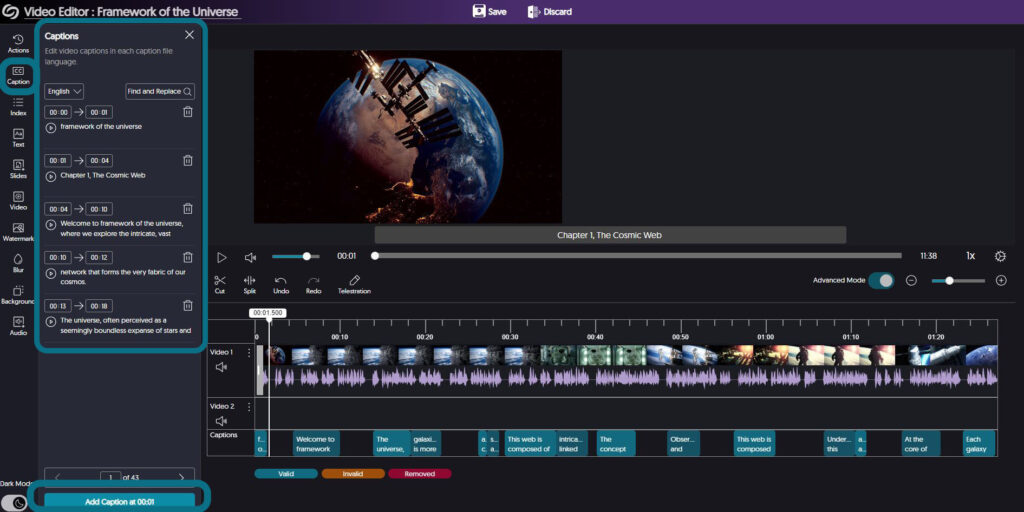
High-quality, human-edited captions and audio descriptions form the bedrock of accessible video use. Learn more about YuJa’s latest tools for editing and sharing video content to engage all of your students. Facilitator: Diana Hernandez, YuJa
At the recent USC Upstate AI Summit in September, participants asked what we know about our students’ view of Generative Artificial Intelligence (GenAI). An exploratory survey of USC Upstate students, faculty, and staff was conducted by members of the AI Training Subcommittee of the AI Strategic Council in Fall 2025. In it, 51% of students identified themselves as AI aware, with a basic understanding of tools they were just starting to test out.
Although the sample is too small to represent the entire student population, the responses offer valuable insights into the ways students use, view, and want to learn about GenAI. Faculty can build on what we know about students’ existing uses of GenAI to develop more sophisticated, critical, and ethical AI literacy skills.
How Students Are Using GenAI
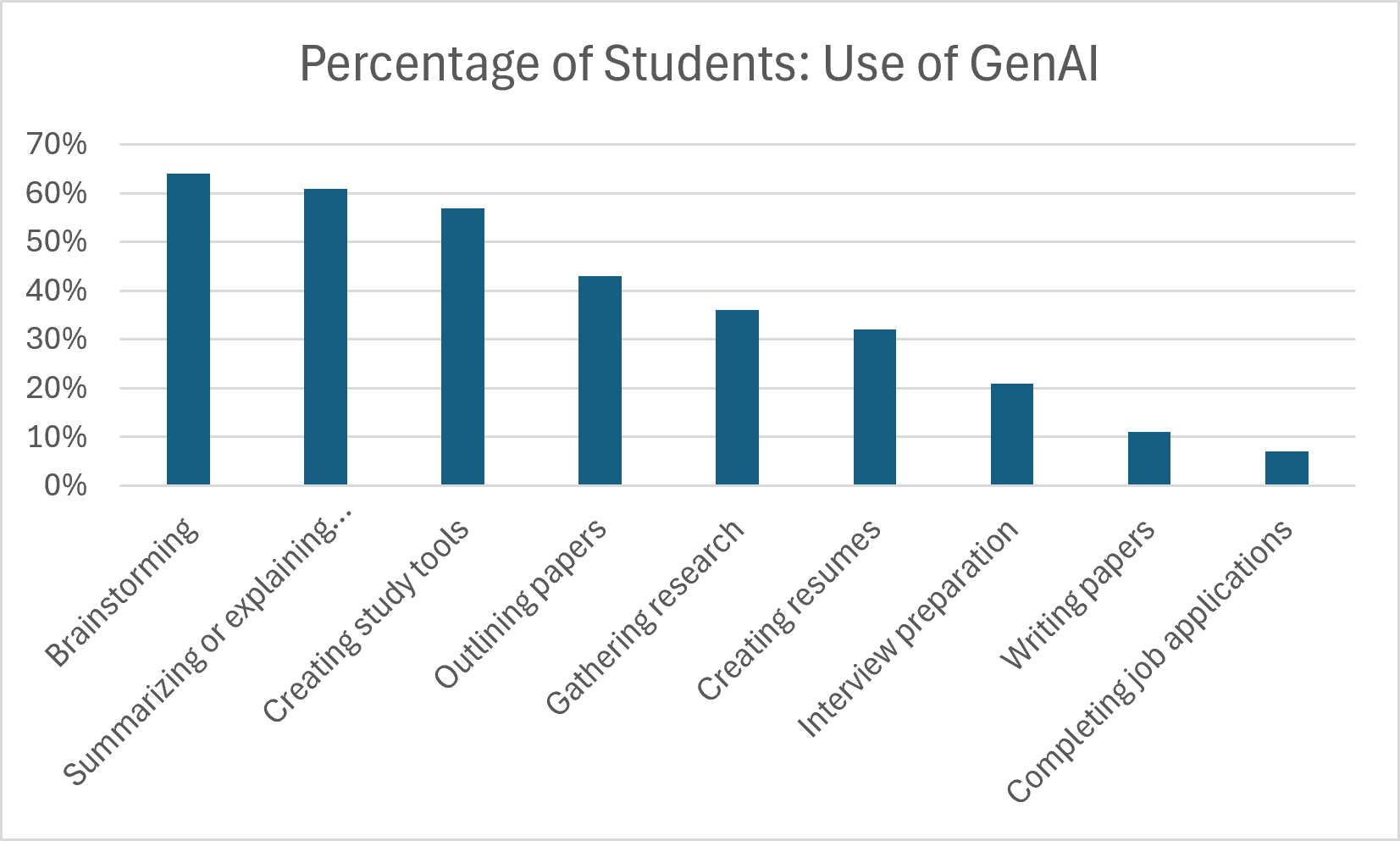
The most common ways students reported using GenAI included brainstorming (64%), summarizing or explaining complex concepts (61%), and creating study tools like flashcards or practice tests (57%). Only 11% selected writing papers, though 43% chose outlining papers and 36% indicated they used GenAI to gather research.
Interestingly, 32% noted they had used GenAI for creating resumes, but only 7% used it to complete job applications and only 21% reported using GenAI to assist with interview preparation.
These preliminary results suggest that students who use GenAI are largely employing it to support their learning rather than to replace independent thinking. However, their responses raise questions about whether they have developed more advanced AI literacy skills of critical evaluation, ethical decision-making, and transferring AI skills to professional contexts.
Although many students reported relying on GenAI for foundational materials, like summaries and explanations, outlines of ideas, and research, their greatest concerns centered on the potential consequences of AI use as a basis for learning and thinking:
88% were moderately or extremely concerned about accuracy and reliability.
83% were moderately or extremely concerned about losing academic skills, including critical thinking and writing.
83% were concerned about data privacy.
81% were concerned about academic misconduct.
The concerns students expressed about the potential costs of AI use align with key AI literacy principles about how AI systems work, how to recognize bias and hallucinations, how to critically evaluate and verify AI outputs for accuracy and bias, and how to maintain integrity by citing AI assistance.
These responses suggest opportunities to strengthen students’ AI literacy skills, both to make their current GenAI use as effective as possible and to engage in more high-impact, human-centered, ethical practices that can contribute to their academic and professional development.
How Students Want to Learn About GenAI
The core question for faculty becomes how to help students develop critical AI literacy skills. Among students who responded to questions about their experience with GenAI:
78% described themselves as just learning about GenAI or having only a basic understanding.
58% reported no weekly use of AI tools like ChatGPT, Copilot, Gemini, Claude, or Grammarly.
73% had not participated in any GenAI training or learning opportunities.
When the survey asked students what forms of GenAI training they would like to have, 65% said none. These results remind us that students have different levels of interest in AI, and that developing AI literacy should include opportunities to critically examine the technology rather than simply encouraging its use.
Among the training options offered, integrating AI into existing required courses and attending university-sponsored workshops were the most frequently selected, each chosen by 21% of respondents. Students were less likely to select dedicated AI courses, interactive games, or student organizations focused on AI.
More than any other type of support listed on the survey, students selected examples of appropriate AI use as the key to helping them feel more confident using GenAI.
For example, a faculty member might demonstrate how ChatGPT.Edu can generate practice questions while also showing students how to verify sample answers against course materials. Or better yet, encourage metacognition by asking students to explain the concepts to a chatbot programmed to ask clarifying questions. Students can then reflect on where their explanations were strong and where they revealed gaps in understanding.
An instructor may assign a research project that begins in class using GenAI in groups, then asks students to locate and verify the sources using the library or other credible sites. Then, show students how to design follow-up prompts to help them evaluate the sources’ credibility, accuracy, and relevance to the project or to find gaps and blind spots in their research.
Faculty might build on students’ existing use of GenAI for brainstorming by asking students to refine prompts with greater context, solicit multiple possible responses and compare them, and explain which ideas they accepted or rejected and why.
Next Steps Toward AI Literacy
As we incorporate AI into our academic settings, it is important to continue to invite student perspectives on how they can best learn about this technology that is bringing waves of change to society. Consider starting up a conversation rooted in the needs of your discipline and your course. Then, guide students toward higher levels of AI literacy that will help them make critical evaluations and ethical decisions in your course and beyond.
We can start with a simple question:
When does AI help you learn, and when might it get in the way?