Within your Blackboard learning management system (LMS) platform, you can use AI to generate rubrics specifically matched to your assignment instructions and the learning outcomes of your course. As you create an assignment, just click Add Rubric, then generate Rubric to reach the AI rubric interface.
Cut and paste assignment instructions, course outcomes, and even a Word document table of an existing rubric, then set the parameters for the ways you wish to assess your students’ work, such as points v. percentage, performance categories, number of evaluation criteria. Finally, edit the performance descriptions to make the rubric work well for both you and your students.
Bonus Tip: Grading assignments using a rubric can streamline your grading workflow and decrease the amount of time spent on grading. Use rubric performance descriptions to explain the typical issues seen at that level of performance to avoid repeating the same kinds of comments in your personalized feedback to each student.
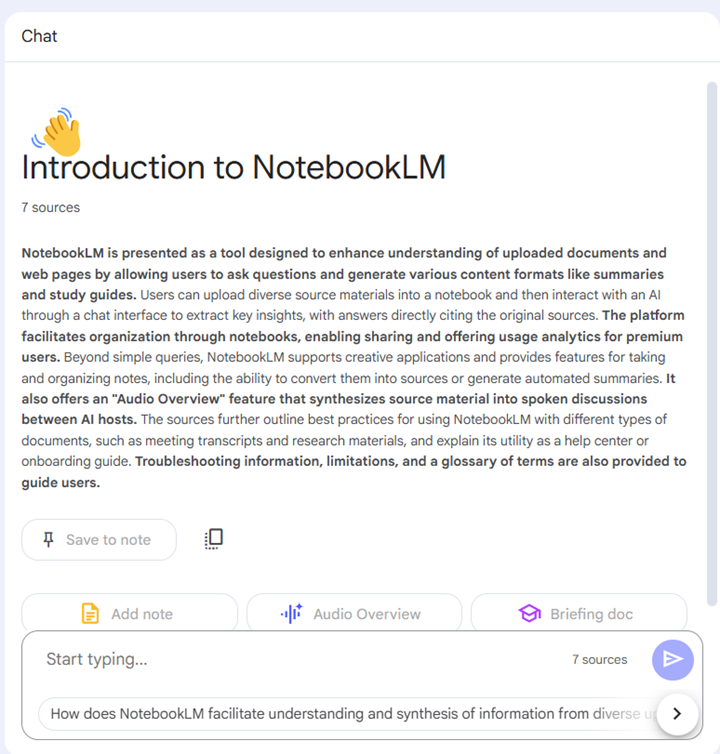
Google’s NotebookLM can be an innovative partner as you design instructional materials. Upload up to 20 sources–including YouTube videos and audio files–then ask NotebookLM to create summaries, notes, assessment questions, and even an AI-generated podcast conversation based on the sources you select.
It is important to be attentive to FERPA, data privacy, copyright and intellectual property laws and policies as you select sources to load into NotebookLM. Open Educational Resources, publicly-available and public domain sources, and materials you design are all great options for sources to include.
Bonus Tip: Share your notebooks with colleagues and collaborators who can edit materials in a shared project, or share view and interaction access with students to create an interactive learning experience covering multiple course sources in different formats.
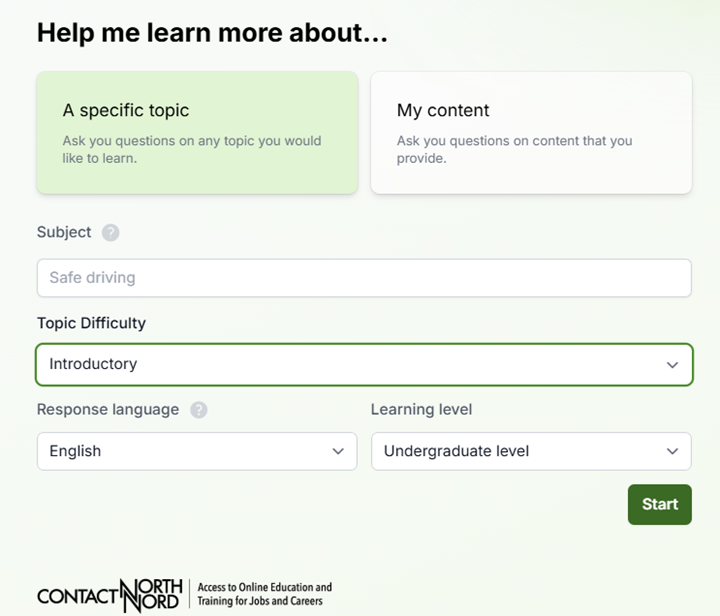
ContactNord’s AI Tutor Pro offers students opportunities to chat with AI to either check their knowledge and skills or deepen their knowledge on a topic. Students select their learning level (e.g., undergraduate or graduate), level of difficulty (introductory through advanced), their preferred language, and the topic or content they wish to explore.
AI Tutor Pro follows guidelines for coaching learners, not providing them answers, so instructors can trust that this interface will not write a paper for a student.
Bonus: At the end of their AI tutoring session, students can download their chat transcript and turn it in as an assignment in your course. Ask learners to add a reflection about the AI’s accuracy and/or bias to prompt students to think critically about the strengths and limitations of AI.
Guide students to prepare for interviews, debates, or meetings with marketing clients, patients in healthcare settings, or other professionals in your discipline using artificial intelligence. The AI Conversation tool, built into your Blackboard course, enables students to work with AI in a controlled environment. You set the topic, you define the conversation persona, select Role Play and read a record of your students’ chat.
Bonus: Your persona may be instructed to speak in languages other than English, and you may give them location-specific backgrounds to support learning in world language courses.
At the end of their chat, students respond to a reflection question you design to help them apply critical thinking and ethics to their AI use.
Join us for our 5th Annual Blackboard Day in the College of Arts & Sciences Building, by accessing Zoom in the CAIFS PD Course, or by using the Zoom Link!
Join the Blackboard Support Team to learn what is new in the Blackboard Learn Ultra Road Map for Spring-Fall 2025.
Look for new release conditions, AI Debates, Achievements, Competency-Based Learning, and much more!
9:45 am to 10:30 am
Blackboard Learn Ultra Instructional Materials
Let’s dive into Ultra and learn our way around the updated content design options. Use blocks to place media and text side-by-side. Or explore Knowledge Check features that can keep students engaged with course content. Facilitator: Jennifer Bland, Learning Experience Designer.
10:45 am to 11:30 am
Grading and Plagiarism Checking in Blackboard Learn Ultra
Looking for your Needs Grading list or how to drop the lowest quiz grade? In this session, we’ll get to know the Ultra Gradebook and where to find all the features you need. We’ll also explore a range of question analytics, plagiarism reports, and student support features for accommodations, extensions, and exemptions in the Ultra Gradebook. Facilitator: Celena Kusch, Executive Director, Academic Innovation & Faculty Support.
11:45 am to 12:30 pm
Using Activity Reports for Student Success
This presentation will look at the Blackboard Ultra features, like progress checking and activity reports, that allow faculty to easily monitor student engagement and performance in real-time. By regularly reviewing student course participation and performance and communicating with students about how they’re doing, instructors have a strong opportunity to foster student success and persistence. Facilitator: Lillian Reeves, Director of Transformative and Inclusive Pedagogy.
12:30 pm to 1:15 pm
Lunch
Take a break, and drop by CASB, Room 117, with your laptop for lunch, brainstorming and troubleshooting within your course.
Do you need a sandbox course for playing around in Blackboard Learn Ultra Course View? Email academicinnovation@uscupstate.edu.
1:15 pm to 2:00 pm
Course Design in a GenAI Learning Environment
Anthology, Blackboard’s parent company, has partnered with Microsoft Artificial Intelligence (AI) to develop easy-to-use tools enhanced by generative artificial intelligence and large language models. In this session, we will go over several key AI Design Assist tools and AI-based assignment options. Facilitator: Yamil Ernesto Ruiz, Director of Online Learning and Program Support
2:15 pm to 3:00 pm
Let’s Talk Teaching: Blackboard Course Design Q&A
Share your question, ideas, and course design dreams. How can the USC Upstate Syllabus Template help you streamline your course setup and conversion to a new term?
As Gen AI (GAI) tools proliferated across the globe during the last few semesters, did you find yourself panicked, excited, or feeling a bit of both? Were you overwhelmed by the implications for academic integrity or overcome by a sense of wonder at the boundless potential to innovate our teaching, learning, and research? Your reactions are likely to guide your AI Use policies in your classrooms. Here’s how to communicate your expectations clearly to your students.




 Join the Blackboard Support Team to learn what is new in the Blackboard Learn Ultra Road Map for Spring-Fall 2025.
 Let’s dive into Ultra and learn our way around the updated content design options. Use blocks to place media and text side-by-side. Or explore Knowledge Check features that can keep students engaged with course content. Facilitator: Jennifer Bland, Learning Experience Designer.
 Looking for your Needs Grading list or how to drop the lowest quiz grade? In this session, we’ll get to know the Ultra Gradebook and where to find all the features you need. We’ll also explore a range of question analytics, plagiarism reports, and student support features for accommodations, extensions, and exemptions in the Ultra Gradebook. Facilitator: Celena Kusch, Executive Director, Academic Innovation & Faculty Support.
 This presentation will look at the Blackboard Ultra features, like progress checking and activity reports, that allow faculty to easily monitor student engagement and performance in real-time. By regularly reviewing student course participation and performance and communicating with students about how they’re doing, instructors have a strong opportunity to foster student success and persistence. Facilitator: Lillian Reeves, Director of Transformative and Inclusive Pedagogy.
 Take a break, and drop by CASB, Room 117, with your laptop for lunch, brainstorming and troubleshooting within your course.
 Anthology, Blackboard’s parent company, has partnered with Microsoft Artificial Intelligence (AI) to develop easy-to-use tools enhanced by generative artificial intelligence and large language models. In this session, we will go over several key AI Design Assist tools and AI-based assignment options. Facilitator: Yamil Ernesto Ruiz, Director of Online Learning and Program Support
 Share your question, ideas, and course design dreams. How can the USC Upstate Syllabus Template help you streamline your course setup and conversion to a new term?