Students walking around an imaginary college landscape with buildings, books, and larger-than-life computers.

AI Spark Tips: Coaching Students for Ethical AI Use

The UNESCO AI Competency Framework for Students stresses the importance of AI ethics and a human-centered mindset. As educators, our goal is to guide students in their progress from novice to expert. Helping students develop responsible and effective AI prompting techniques can be an important part of their learning journey.
Cover of the UNESCO AI Competency Framework for Students

100 Chats for College Students

Task-based AI prompts can be a real leveler for students who complete their work after hours when it is not possible to meet with instructors in office hours. Templates for chat prompts can keep students learning ethically with support from AI.
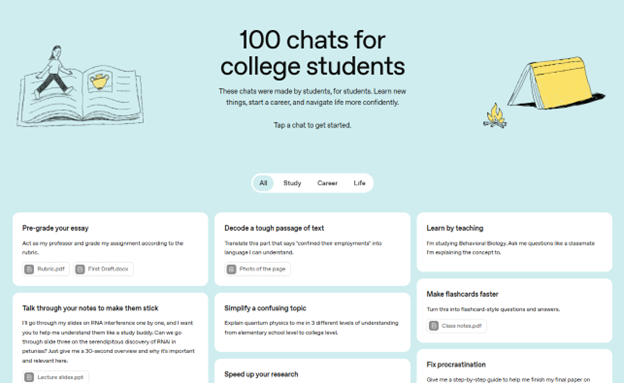
100 chats for college students screenshot
ChatGPT’s 100 Chats for College Students

Some great examples of learning-forward chat prompts on the 100 chats list include the following:

  • I’m studying Behavioral Biology. Ask me questions like a classmate I’m explaining the concept to.
  • Guide me by asking open-ended questions to encourage reflection, critical thinking, and application of knowledge. Do not lecture or list facts unless I request clarification. Begin by asking me about the notes I uploaded. [Attach documents]
  • Give me a step-by-step guide to help me finish an 8-page research paper about the sociology of cities. Make the steps as small and achievable as possible. My paper is due in 10 days.

Bonus Tip

Blackboard’s AI Conversation assignment can provide a guided path for students to accomplish a specific task using AI. Set up the AI Conversation persona to be a peer tutor, an academic success coach, a career center advisor, or a virtual teaching assistant for your course with graduate credentials and a supportive attitude. Give the AI persona instructions for the kinds of answers they will provide (e.g. always end with a question, base answers on evidence-based advice related to study skills, etc.). Then, set up the scenario you’d like your students to engage with AI.

Find out more about AI Conversations Role Play.

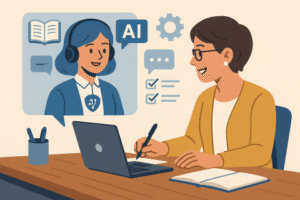
Two people at a table talking over a laptop screen.

Detection, Dialogue, and Innovation in Classroom Uses of AI 

Despite the relative newness of AI tools for all, surveys conducted by the Digital Education Council, Chegg, and TechTrends found that more than 80% of students have already built AI into their learning lives. According to the survey results, students are using tools like ChatGPT, Grammarly, and CoPilot primarily to search for information, check grammar and improve their writing, summarize and paraphrase documents, create first drafts, explain complex concepts, and suggest research projects.

While these efforts provide students with several benefits, students remain skeptical of AI’s accuracy. Chegg’s survey found that 53% of students were concerned about content reliability and the ethical implications of using the tools. They also were worried about data privacy and whether or not using AI tools diminished their ability to think critically. As we all continue to navigate AI’s uses in higher ed, having a plan for AI use and talking candidly with students about your expectations and theirs, may reduce some of the uncertainty everyone has about when and where to use AI.  

Continue reading “Detection, Dialogue, and Innovation in Classroom Uses of AI “
Students walking around an imaginary college landscape with buildings, books, and larger-than-life computers.

AI Spark Tips: AI Support for Feedback in Blackboard

Providing timely and meaningful feedback to students is one of the most crucial and most time-consuming instructional activities. The Blackboard Learning Management System (LMS) offers the AI Virtual Assistant (AVA) to leverage its password-protected, closed GenAI environment to streamline and speed up the grading and feedback process. Instructors may use AVA

  • to suggest feedback comments based on rubric scores or
  • to rewrite hand-written comments to improve the tone and effectiveness of constructive feedback to students.
AI Virtual Assistant in a computer supporting a university instructor in a course.
AI-Generated Image

Getting Started with AVA for Student Feedback

Your Blackboard course enables you to use AVA feedback generation on any assignment or test (discussions coming soon) on the Flexible Grading page. You may read the student’s work and manually assess the work using your built-in rubric, then ask AVA to Summarize the rubric in the feedback box.

Screenshot of AI Writing Tools in Student Grading Feedback.
AI Writing Tools: Summarize Rubric Feedback Option

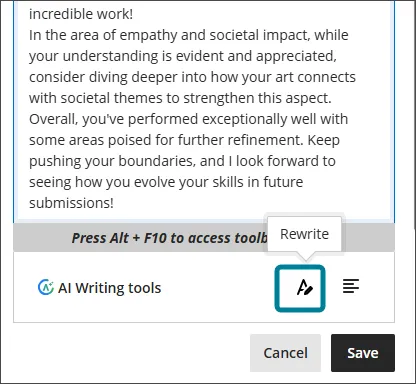
Alternatively, you may draft your own feedback, then ask AVA to suggest a Rewrite.

Screenshot of Blackboard Artificial Intelligence Virtual Assistant Rewrite Feedback Tool
AI Writing Tools: Rewrite Feedback Option

In both cases, you decide whether you wish to Save, Discard, or Try Again for the draft feedback. After saving, you may edit the text to match your voice and provide additional expert perspectives on your student’s work.

Why Use AVA v. ChatGPT?

The benefit of AVA is enhanced privacy and security. Blackboard is committed to meeting FERPA standards, and students expect that their work will be submitted securely into the LMS. Our contract with Blackboard foregrounds responsibility for FERPA compliance and builds those protections into its custom-built AI tools.

ChatGPT is not FERPA Compliant. While ChatGPT.Edu offers more tools for institutions to implement FERPA Compliance protections, those tools must be maintained by the campus administrators, and instructors must be in their institutional ChatGPT.Edu accounts to take advantage of those protections.

Bonus Tip: Use the Blackboard AI Design Assistant to generate a rubric for your assignment to enhance the quality of your feedback.

As AVA evolves, Blackboard will use GenAI to analyze feedback across rubrics, assignments, and courses and to make personalized suggestions for improvement to students. Find out more about the complete AVA Roadmap.

Students walking around an imaginary college landscape with buildings, books, and larger-than-life computers.

AI Spark Tips: Welcome to ChatGPT.Edu

Beginning in Fall 2025, USC Upstate is making available ChatGPT.Edu accounts for faculty, staff, and students. Along with Microsoft Copilot, ChatGPT.Edu is the University-provided Generative AI (GenAI) tool.

Getting Started with ChatGPT.Edu

Your ChatGPT.Edu account enables you to use single-sign-on with your USC Upstate email account and enjoy GenAI with a high level of privacy and security. While you should never share FERPA-protected, HIPAA-protected, or Personally Identifiable Information with a GenAI tool, you may share less sensitive information without the risk of that information being released publicly or being used to train future GenAI models.

Ready to start using ChatGPT.Edu?

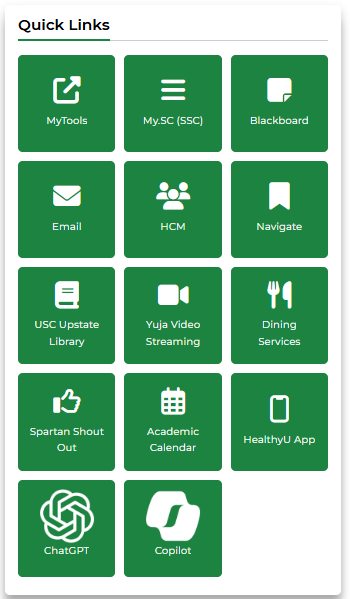
USC Upstate faculty, staff, and students may access ChatGPT.Edu through the Spartan Hub intranet link (login with USC Upstate email username and password). Look for the ChatGPT logo in the lower left in the Quick Links on your Spartan Hub Employee or Student home page. For questions about accessing your account, please call the Help Desk at 864-503-5257.

Screenshot of SpartanHub Employee Quick Links, featuring the ChatGPT icon in the lower left

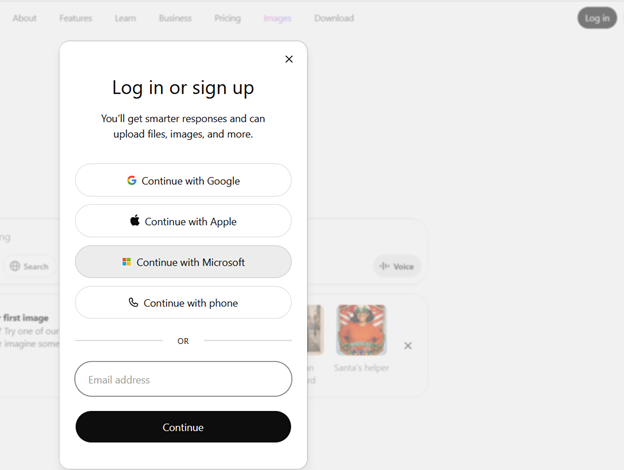
You may also login by going directly to ChatGPT.com. Click Log in, then select Continue with Microsoft. Use your USC Upstate email username and password to access your free ChatGPT.Edu account.

Screenshot of ChatGPT login options, with Continue with Microsoft highlighted

Interacting with Chat

As a type of GenAI, ChatGPT.Edu generates text, code, images, and even video based on the most probable information of that type it finds in similar contexts. The fastest way to get to know ChatGPT.Edu is to tell it details about your context and ask it to suggest a way to achieve something you need.

For example, say you are working with several student advisees or mentees, and you’d like to use GenAI to streamline your email communications throughout the semester. You may tell ChatGPT.Edu that you are an advisor at an institution of higher education, and you are looking for strategies to streamline your email communications with your student advisees by using email templates and scheduled messages within Microsoft Outlook.

Ask ChatGPT.Edu to suggest strategies for using automated email templates to offer supportive and timely notifications to your student advisees. Then, follow its lead!

ChatGPT.Edu may recommend different automation techniques you may wish to try with Microsoft Outlook. It may offer to write sample email templates for you. Or it may suggest ways for you to integrate Mail Merges or other strategies to streamline your communication process. Use the chat to follow up on those suggestions that seem best for you.

In general, a great way to start is to ask ChatGPT.Edu to suggest a detailed prompt for accomplishing the goal you are trying to achieve. Then, use its recommended prompt to ask it for your desired outcome.

Bonus Tip: The ChatGPT.Edu initiative began as a partnership between OpenAI and leading research universities. Find out more about how higher education institutions are using ChatGPT.Edu to bring AI to their campuses responsibly.

Students walking around an imaginary college landscape with buildings, books, and larger-than-life computers.

AI Spark Tips: Engaging Students’ Creativity with GenAI

Carol Denning-Broadus, Associate Instructor, has always used creative projects to engage her students with complex scientific concepts. In the past, her Introduction to Anthropology courses (ANTH U102) asked students to create analog board games to convey information about rites of passage in different cultures. Today, she uses Generative Artificial Intelligence (GenAI) tools to enable students to envision new worlds.

In Environmental Science (BIOL U270), Broadus invites students to view Avatar: The Way of the Water through a scientific lens. Students analyze the fictional ecosystems in class, then they use Microsoft CoPilot, ChatGPT, or other GenAI image generators to create new creatures that could be at home in the environment of the planet Pandora. The students’ creations often look like they could step right out of a video game.

Fantastic scene of a tidal pool full of bioluminescent plants and creatures on a fictional planet

Students work with GenAI to describe the features that will make their creatures into apex predators, prey species, or vegetation within the Pandoran oceans or landscapes. Students then write a report describing their creature’s environmental adaptations, food sources, and other features that make their creations a productive part of the ecosystems on the world of Pandora.

Bonus Tip: If you regularly use ChatGPT to make images, your images are saved in one place, in your ChatGPT Image Library.

Thank you to professor Broadus, former Bill Drake Outstanding Adjunct Faculty Member of the Year, for sharing her inspiring assignment ideas!

Students walking around an imaginary college landscape with buildings, books, and larger-than-life computers.

AI Spark Tips: How AI Ready Are You?

New AI tools emerge every day. A recent Y Combinator podcast claims that 5 new Agentic AI companies will arise for every cloud-based application we use today. No conventional human could ever keep up.

Today’s tool encourages us to take a pause and reflect on how ready we are for the onslaught of opportunities we find in Generative AI and related apps. The approximately 20-minute AI Knowledge Check created by the University of Saskatchewan provides a guided tune-up of AI literacy skills. This Knowledge Check can serve as a launching point to open a class unit about AI ethics or a research-based project where you may or may not encourage students to use AI.

Bonus Tip: Throughout the AI Knowledge Check tool, users are introduced to tips and resources about “Being AI Literate.” These resources include the ROBOT Checklist for responsible AI, the UNESCO AI Competency Framework for Students, tips for evaluating GenAI Outputs, and an overview of Human-Centered AI.

Screenshot of the AI Knowledge Check site at the University of Saskatchewan Library