Students walking around an imaginary college landscape with buildings, books, and larger-than-life computers.

AI Spark Tips: AI Support for Feedback in Blackboard

Providing timely and meaningful feedback to students is one of the most crucial and most time-consuming instructional activities. The Blackboard Learning Management System (LMS) offers the AI Virtual Assistant (AVA) to leverage its password-protected, closed GenAI environment to streamline and speed up the grading and feedback process. Instructors may use AVA

  • to suggest feedback comments based on rubric scores or
  • to rewrite hand-written comments to improve the tone and effectiveness of constructive feedback to students.
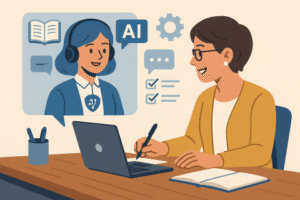
AI Virtual Assistant in a computer supporting a university instructor in a course.
AI-Generated Image

Getting Started with AVA for Student Feedback

Your Blackboard course enables you to use AVA feedback generation on any assignment or test (discussions coming soon) on the Flexible Grading page. You may read the student’s work and manually assess the work using your built-in rubric, then ask AVA to Summarize the rubric in the feedback box.

Screenshot of AI Writing Tools in Student Grading Feedback.
AI Writing Tools: Summarize Rubric Feedback Option

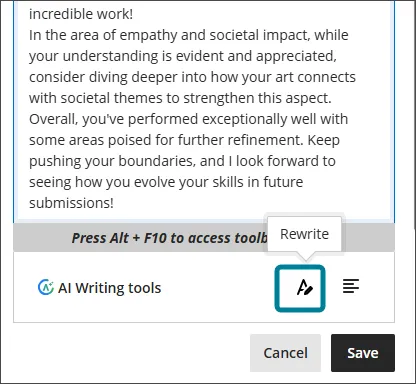
Alternatively, you may draft your own feedback, then ask AVA to suggest a Rewrite.

Screenshot of Blackboard Artificial Intelligence Virtual Assistant Rewrite Feedback Tool
AI Writing Tools: Rewrite Feedback Option

In both cases, you decide whether you wish to Save, Discard, or Try Again for the draft feedback. After saving, you may edit the text to match your voice and provide additional expert perspectives on your student’s work.

Why Use AVA v. ChatGPT?

The benefit of AVA is enhanced privacy and security. Blackboard is committed to meeting FERPA standards, and students expect that their work will be submitted securely into the LMS. Our contract with Blackboard foregrounds responsibility for FERPA compliance and builds those protections into its custom-built AI tools.

ChatGPT is not FERPA Compliant. While ChatGPT.Edu offers more tools for institutions to implement FERPA Compliance protections, those tools must be maintained by the campus administrators, and instructors must be in their institutional ChatGPT.Edu accounts to take advantage of those protections.

Bonus Tip: Use the Blackboard AI Design Assistant to generate a rubric for your assignment to enhance the quality of your feedback.

As AVA evolves, Blackboard will use GenAI to analyze feedback across rubrics, assignments, and courses and to make personalized suggestions for improvement to students. Find out more about the complete AVA Roadmap.

Faculty member speaking at a small podium to the side of projection slide. Three rows of students face the projection screen.

Building Classroom Connections, One Name at a Time

Peter Felten recently gave a memorable workshop for USC Upstate’s Fall Faculty Day. In addition to being a kind, funny, and passionate student advocate, he left us with plenty to think about – and to act on – as we launch into the fall semester. Much of his research shows that small adjustments in faculty and staff interactions with students can make a huge impact. One such small adjustment may be learning our students’ names in the first few weeks of class. Learning and using students’ names builds trust and can help create a supportive and inviting classroom environment. It also forms the basis for how we can ensure every student experiences “genuine welcome and deep care. All students need to understand that they are valued as people.

Continue reading “Building Classroom Connections, One Name at a Time”
Students walking around an imaginary college landscape with buildings, books, and larger-than-life computers.

AI Spark Tips: Welcome to ChatGPT.Edu

Beginning in Fall 2025, USC Upstate is making available ChatGPT.Edu accounts for faculty, staff, and students. Along with Microsoft Copilot, ChatGPT.Edu is the University-provided Generative AI (GenAI) tool.

Getting Started with ChatGPT.Edu

Your ChatGPT.Edu account enables you to use single-sign-on with your USC Upstate email account and enjoy GenAI with a high level of privacy and security. While you should never share FERPA-protected, HIPAA-protected, or Personally Identifiable Information with a GenAI tool, you may share less sensitive information without the risk of that information being released publicly or being used to train future GenAI models.

Ready to start using ChatGPT.Edu?

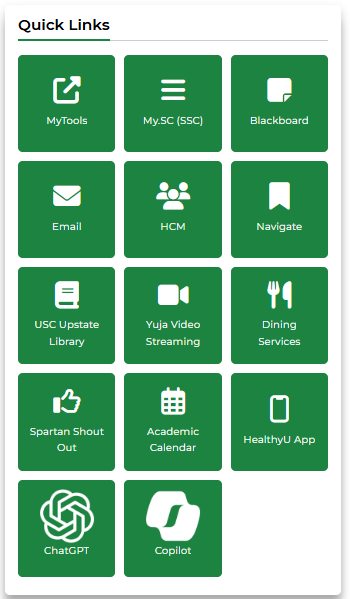
USC Upstate faculty, staff, and students may access ChatGPT.Edu through the Spartan Hub intranet link (login with USC Upstate email username and password). Look for the ChatGPT logo in the lower left in the Quick Links on your Spartan Hub Employee or Student home page. For questions about accessing your account, please call the Help Desk at 864-503-5257.

Screenshot of SpartanHub Employee Quick Links, featuring the ChatGPT icon in the lower left

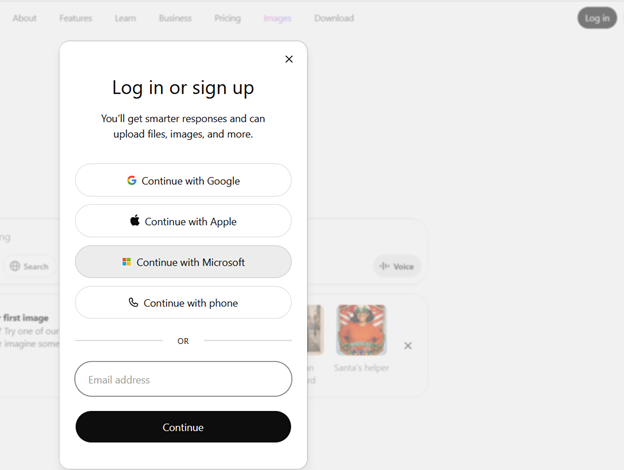
You may also login by going directly to ChatGPT.com. Click Log in, then select Continue with Microsoft. Use your USC Upstate email username and password to access your free ChatGPT.Edu account.

Screenshot of ChatGPT login options, with Continue with Microsoft highlighted

Interacting with Chat

As a type of GenAI, ChatGPT.Edu generates text, code, images, and even video based on the most probable information of that type it finds in similar contexts. The fastest way to get to know ChatGPT.Edu is to tell it details about your context and ask it to suggest a way to achieve something you need.

For example, say you are working with several student advisees or mentees, and you’d like to use GenAI to streamline your email communications throughout the semester. You may tell ChatGPT.Edu that you are an advisor at an institution of higher education, and you are looking for strategies to streamline your email communications with your student advisees by using email templates and scheduled messages within Microsoft Outlook.

Ask ChatGPT.Edu to suggest strategies for using automated email templates to offer supportive and timely notifications to your student advisees. Then, follow its lead!

ChatGPT.Edu may recommend different automation techniques you may wish to try with Microsoft Outlook. It may offer to write sample email templates for you. Or it may suggest ways for you to integrate Mail Merges or other strategies to streamline your communication process. Use the chat to follow up on those suggestions that seem best for you.

In general, a great way to start is to ask ChatGPT.Edu to suggest a detailed prompt for accomplishing the goal you are trying to achieve. Then, use its recommended prompt to ask it for your desired outcome.

Bonus Tip: The ChatGPT.Edu initiative began as a partnership between OpenAI and leading research universities. Find out more about how higher education institutions are using ChatGPT.Edu to bring AI to their campuses responsibly.

This is an infographic titled "accessibility work in spartanverse: how faculty might divide accessibility work for digital learning materials." There are several faculty and droids at computers with words like "video captions", "accessible documents", and "alt text for images" above each work station.

How Star Wars is Your Course?

In a recent video from Innovative Educators, Tom Tobin gives a short overview of what we can learn from Star Wars about making accessible places where intergalactic beings and droids can easily get around and communicate with each other. He highlights the consistent use of ramps, wide doors, limited or no stairs, and translation devices. Other Star Wars features include personal mobility devices that look like furniture or speeders, droid medical, automotive, and air traffic technicians and AI-assisted companions, sensory-rich and sensory-adjustable environments, fully accessible government, educational, medical, and community spaces, and wearable personal navigation tools. While some of these enduring, universal design features were meant to help us imagine an exciting galactic future, the film team of the franchise’s first movie was comprised of people from across the ability spectrum who used their needs and knowledge to intentionally shape and show a more accessible, usable world where anyone could be a hero. 

Continue reading “How Star Wars is Your Course?”
Faculty friends enjoy a coffee and a laugh together.

Informal Mentorship in Action

When I began teaching as a tenure track, assistant professor, I quickly realized I needed guidance and support when it came to pursuing scholarship, deciding which committees to serve on, and teaching in a new context. At the same time, I also discovered that the faculty around me, across the hall and in departmental and university meetings were open and willing to answer my questions, suggest collaborations, and give me the scoop on which committees to serve on. Though I had an assigned mentor who also supported me, it was the informal listening, solution-seeking, and friendship that helped create a strong sense of belonging, a commitment to persistence, and a collegial environment that I had not anticipated. In addition to being a friendly presence, mentors typically have valuable institutional knowledge about expectations, resources, opportunities, rules, and procedures and can share them in a conversational and invitational way.  

Continue reading “Informal Mentorship in Action”
A human head silhouette filled with brightly colored gears to illustrate critical thinking.

Teaching Critical Thinking is Essential

Critical thinking is a common cornerstone of education, emphasized across K-12 and higher education standards – from Common Core to NGSS to NACE and AACN. Yet, while it’s widely recognized as essential, students are rarely taught how to think critically in explicit, structured ways. This post offers some practical guidance for faculty to intentionally cultivate critical thinking in their courses. Or, if you want to take a deeper dive, consider completing ACUE’s short course (less than an hour), “Developing Students’ Critical Thinking and Analytical Skills,” on evidence-based ways to bring more critical thinking skills to your teaching. If you don’t have an ACUE Commons account yet, contact me at reeveslg@uscupstate.edu to get started! Learn more about ACUE’s Critical Thinking Short course here.

Continue reading “Teaching Critical Thinking is Essential”