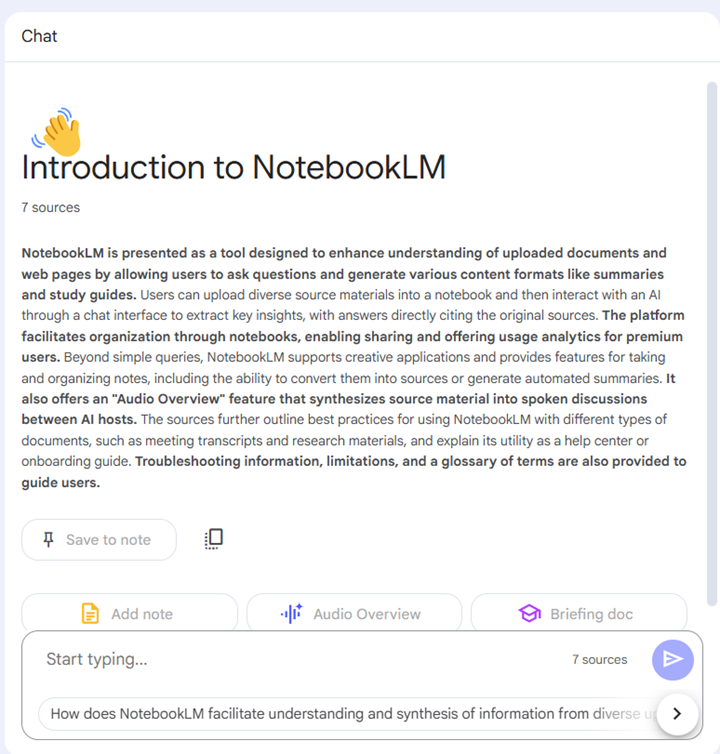
Google’s NotebookLM can be an innovative partner as you design instructional materials. Upload up to 20 sources–including YouTube videos and audio files–then ask NotebookLM to create summaries, notes, assessment questions, and even an AI-generated podcast conversation based on the sources you select.
It is important to be attentive to FERPA, data privacy, copyright and intellectual property laws and policies as you select sources to load into NotebookLM. Open Educational Resources, publicly-available and public domain sources, and materials you design are all great options for sources to include.
Bonus Tip: Share your notebooks with colleagues and collaborators who can edit materials in a shared project, or share view and interaction access with students to create an interactive learning experience covering multiple course sources in different formats.
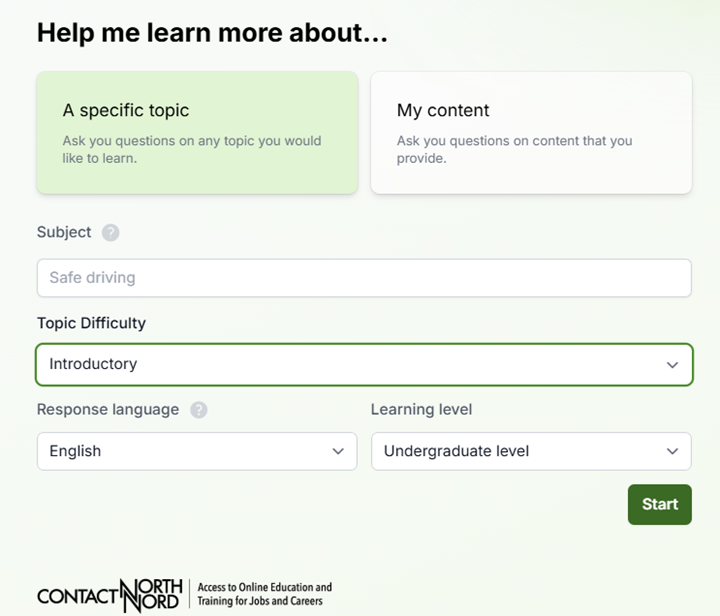
ContactNord’s AI Tutor Pro offers students opportunities to chat with AI to either check their knowledge and skills or deepen their knowledge on a topic. Students select their learning level (e.g., undergraduate or graduate), level of difficulty (introductory through advanced), their preferred language, and the topic or content they wish to explore.
AI Tutor Pro follows guidelines for coaching learners, not providing them answers, so instructors can trust that this interface will not write a paper for a student.
Bonus: At the end of their AI tutoring session, students can download their chat transcript and turn it in as an assignment in your course. Ask learners to add a reflection about the AI’s accuracy and/or bias to prompt students to think critically about the strengths and limitations of AI.
Guide students to prepare for interviews, debates, or meetings with marketing clients, patients in healthcare settings, or other professionals in your discipline using artificial intelligence. The AI Conversation tool, built into your Blackboard course, enables students to work with AI in a controlled environment. You set the topic, you define the conversation persona, select Role Play and read a record of your students’ chat.
Bonus: Your persona may be instructed to speak in languages other than English, and you may give them location-specific backgrounds to support learning in world language courses.
At the end of their chat, students respond to a reflection question you design to help them apply critical thinking and ethics to their AI use.
Join us for our 5th Annual Blackboard Day in the College of Arts & Sciences Building, by accessing Zoom in the CAIFS PD Course, or by using the Zoom Link!
Join the Blackboard Support Team to learn what is new in the Blackboard Learn Ultra Road Map for Spring-Fall 2025.
Look for new release conditions, AI Debates, Achievements, Competency-Based Learning, and much more!
9:45 am to 10:30 am
Blackboard Learn Ultra Instructional Materials
Let’s dive into Ultra and learn our way around the updated content design options. Use blocks to place media and text side-by-side. Or explore Knowledge Check features that can keep students engaged with course content. Facilitator: Jennifer Bland, Learning Experience Designer.
10:45 am to 11:30 am
Grading and Plagiarism Checking in Blackboard Learn Ultra
Looking for your Needs Grading list or how to drop the lowest quiz grade? In this session, we’ll get to know the Ultra Gradebook and where to find all the features you need. We’ll also explore a range of question analytics, plagiarism reports, and student support features for accommodations, extensions, and exemptions in the Ultra Gradebook. Facilitator: Celena Kusch, Executive Director, Academic Innovation & Faculty Support.
11:45 am to 12:30 pm
Using Activity Reports for Student Success
This presentation will look at the Blackboard Ultra features, like progress checking and activity reports, that allow faculty to easily monitor student engagement and performance in real-time. By regularly reviewing student course participation and performance and communicating with students about how they’re doing, instructors have a strong opportunity to foster student success and persistence. Facilitator: Lillian Reeves, Director of Transformative and Inclusive Pedagogy.
12:30 pm to 1:15 pm
Lunch
Take a break, and drop by CASB, Room 117, with your laptop for lunch, brainstorming and troubleshooting within your course.
Do you need a sandbox course for playing around in Blackboard Learn Ultra Course View? Email academicinnovation@uscupstate.edu.
1:15 pm to 2:00 pm
Course Design in a GenAI Learning Environment
Anthology, Blackboard’s parent company, has partnered with Microsoft Artificial Intelligence (AI) to develop easy-to-use tools enhanced by generative artificial intelligence and large language models. In this session, we will go over several key AI Design Assist tools and AI-based assignment options. Facilitator: Yamil Ernesto Ruiz, Director of Online Learning and Program Support
2:15 pm to 3:00 pm
Let’s Talk Teaching: Blackboard Course Design Q&A
Share your question, ideas, and course design dreams. How can the USC Upstate Syllabus Template help you streamline your course setup and conversion to a new term?
Ten years ago, USC Upstate launched its first Active Learning Institute and installed its first active learning classrooms with support from a Title III federal grant. Today, we have 11 state-of-the-art, flexible classrooms in 6 buildings and 100s of enrollments in active learning classes each year.
The results of this 10-year effort are impressive. Over 8,000 unique students have enrolled in active learning courses from 2019-2024 alone. Of our current faculty members, 74 are Active Learning or Engaged Pedagogy Fellows, and many more faculty–especially adjunct faculty–have used their active learning credentials to successfully find full-time teaching positions.
Even more significantly, 94% of the students enrolled in active learning courses from 2021-2023 persisted–meaning they either graduated successfully or returned to USC Upstate the following semester to continue their academic careers. Of the six recent teaching excellence award winners featured in our fall faculty spotlight, three are Engaged Pedagogy Faculty Fellows and one is an Active Learning Faculty Fellow.
What Is Active Learning?
Active Learning is a high-impact teaching practice that meaningfully engages students in interactions with each other and with the course content to enable them to be “co-creators of knowledge.” Students are active participants in class sessions and in their own learning. Implementing active learning strategies means shifting the focus of instruction away from transmitting the instructor’s knowledge to constructing the learners’ knowledge and skills through guided tasks, interactions, assignments, and environments that cultivate deep, meaningful learning.
Active learning strategies can be used in any instructional mode–from face-to-face to online–and in classes of any size, including large nursing or anatomy and physiology courses. USC Upstate’s intensive Engaged Pedagogy and Hybrid Course Design Institute helps to prepare instructors to design hybrid courses to take advanced of flipped learning in online spaces along with rich, interactive learning face-to-face.
Find out more information about Active Learning in our CAIFS Resources for Innovative Course Design. Check out our profiles of Engaged Pedagogy Fellows Astrid Rosario (NSE), Kristi Miller (MBCON), and Shannon Polchow (LLC) to see active learning strategies at work in USC Upstate classrooms.
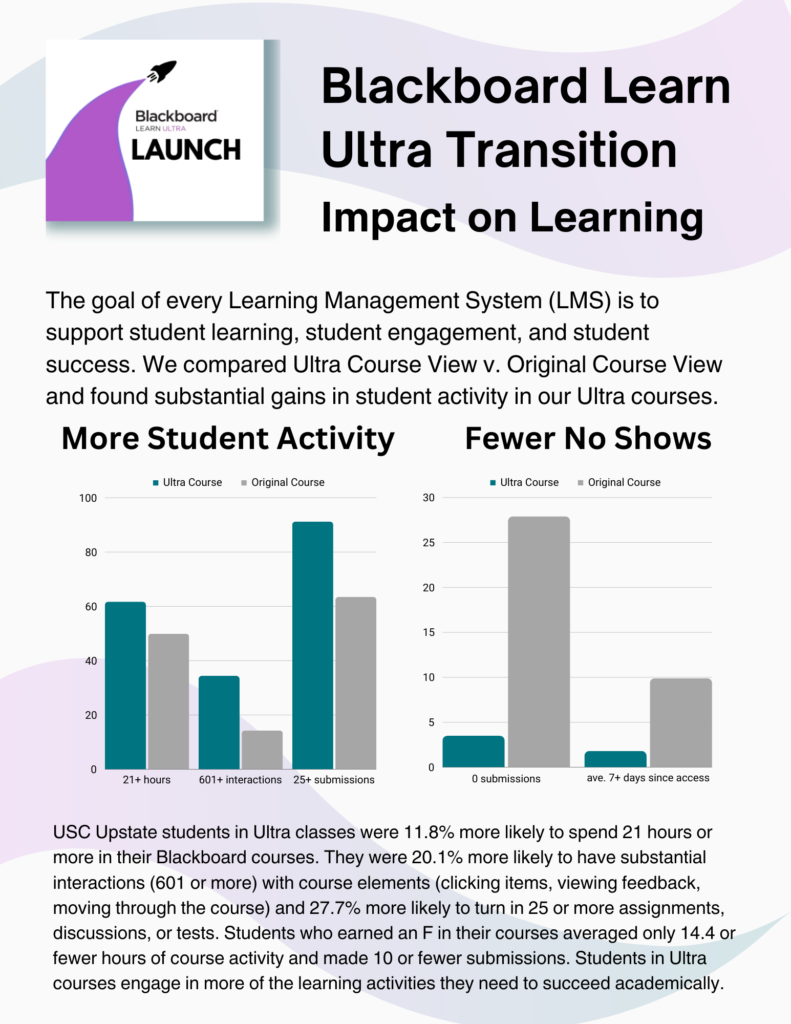
Beginning with Fall 2024, new courses in the University of South Carolina Learning Management System (LMS) will be created in Blackboard Learn Ultra Course View. Based on a comparison of student activity in Ultra v. Original courses, this change has the potential to improve student engagement, increase student activity, and lead to greater student success.
The infographic below shows differences between student activity in Ultra and Original courses in Fall 2023. Significantly more students in Ultra courses spend more active hours (21 or more) in courses, turn in more course submissions, and interact with course materials than their peers in Original courses.
When it comes to students who never submit any work (tests, assignments, quizzes, or discussion posts), only 2.3% of students in Ultra courses had never submitted any work to the course, while 27.9% of students in Original courses had never submitted any work in the course. It is important to note that some face-to-face classes may not require students to turn in work through the LMS, but this alone would not account for an order of magnitude difference in student submission rates.
Already, 27.5% of all Spring 2024 online and hybrid Blackboard courses at 20% of all USC Upstate courses overall are being delivered in Blackboard Learn Ultra. The evidence from student activity and performance data suggests that faculty efforts to make this transition are likely to have a positive impact on student learning outcomes in the future.



 Join the Blackboard Support Team to learn what is new in the Blackboard Learn Ultra Road Map for Spring-Fall 2025.
 Let’s dive into Ultra and learn our way around the updated content design options. Use blocks to place media and text side-by-side. Or explore Knowledge Check features that can keep students engaged with course content. Facilitator: Jennifer Bland, Learning Experience Designer.
 Looking for your Needs Grading list or how to drop the lowest quiz grade? In this session, we’ll get to know the Ultra Gradebook and where to find all the features you need. We’ll also explore a range of question analytics, plagiarism reports, and student support features for accommodations, extensions, and exemptions in the Ultra Gradebook. Facilitator: Celena Kusch, Executive Director, Academic Innovation & Faculty Support.
 This presentation will look at the Blackboard Ultra features, like progress checking and activity reports, that allow faculty to easily monitor student engagement and performance in real-time. By regularly reviewing student course participation and performance and communicating with students about how they’re doing, instructors have a strong opportunity to foster student success and persistence. Facilitator: Lillian Reeves, Director of Transformative and Inclusive Pedagogy.
 Take a break, and drop by CASB, Room 117, with your laptop for lunch, brainstorming and troubleshooting within your course.
 Anthology, Blackboard’s parent company, has partnered with Microsoft Artificial Intelligence (AI) to develop easy-to-use tools enhanced by generative artificial intelligence and large language models. In this session, we will go over several key AI Design Assist tools and AI-based assignment options. Facilitator: Yamil Ernesto Ruiz, Director of Online Learning and Program Support
 Share your question, ideas, and course design dreams. How can the USC Upstate Syllabus Template help you streamline your course setup and conversion to a new term?