
When students feel motivated to learn (University of Buffalo, UW-Whitewater, Kennesaw State), we’re likely to see increases in effort, energy, curiosity, and creativity. We might notice they come to class more, are better prepared, and generally seem open to tackling challenging content or leading a group project. Sometimes, though, even the most motivated students can show a dip in their engagement after midterms, and everyone can use a pick me up to push through the second part of the semester. If you’ve noticed this happening in your classes, try these evidence-based practices to reenergize yourself and your students for the next part of the semester!
Continue reading “Motivation After the Midterm”Active Learning Leads to Student Success

Ten years ago, USC Upstate launched its first Active Learning Institute and installed its first active learning classrooms with support from a Title III federal grant. Today, we have 11 state-of-the-art, flexible classrooms in 6 buildings and 100s of enrollments in active learning classes each year.
The results of this 10-year effort are impressive. Over 8,000 unique students have enrolled in active learning courses from 2019-2024 alone. Of our current faculty members, 74 are Active Learning or Engaged Pedagogy Fellows, and many more faculty–especially adjunct faculty–have used their active learning credentials to successfully find full-time teaching positions.
Even more significantly, 94% of the students enrolled in active learning courses from 2021-2023 persisted–meaning they either graduated successfully or returned to USC Upstate the following semester to continue their academic careers. Of the six recent teaching excellence award winners featured in our fall faculty spotlight, three are Engaged Pedagogy Faculty Fellows and one is an Active Learning Faculty Fellow.
What Is Active Learning?
Active Learning is a high-impact teaching practice that meaningfully engages students in interactions with each other and with the course content to enable them to be “co-creators of knowledge.” Students are active participants in class sessions and in their own learning. Implementing active learning strategies means shifting the focus of instruction away from transmitting the instructor’s knowledge to constructing the learners’ knowledge and skills through guided tasks, interactions, assignments, and environments that cultivate deep, meaningful learning.
Active learning strategies can be used in any instructional mode–from face-to-face to online–and in classes of any size, including large nursing or anatomy and physiology courses. USC Upstate’s intensive Engaged Pedagogy and Hybrid Course Design Institute helps to prepare instructors to design hybrid courses to take advanced of flipped learning in online spaces along with rich, interactive learning face-to-face.
Find out more information about Active Learning in our CAIFS Resources for Innovative Course Design. Check out our profiles of Engaged Pedagogy Fellows Astrid Rosario (NSE), Kristi Miller (MBCON), and Shannon Polchow (LLC) to see active learning strategies at work in USC Upstate classrooms.


LibGuides are Now Linked to Blackboard Ultra
If you’ve been looking for ways to encourage students to know about and to use the well-designed and impeccably curated content from the Library, look no further. There are several new features in Blackboard Ultra that will bring library resources right to your course.
Continue reading “LibGuides are Now Linked to Blackboard Ultra”
Responding to Ally Accessibility Scores in Your Courses
The USC Upstate Accessibility Commitment aims to ensure students, faculty, and staff have access to all spaces and materials where learning takes place. Luckily, Blackboard Ultra has made faculty’s role in fulling this commitment easier than ever. The university-adopted quality assurance program holds all courses to a high standard of accessibility, including expectations that all documents use heading style formats, color contrast, and accessible tables; that videos have accurate closed captions; and that audio files or recordings have transcripts to ensure barrier-free learning opportunities for all students. It may sound like a lot of work to manage and create accessible content, but all of our content tools, from Adobe to Word to Blackboard Ultra, have embedded checks and remedies to help us achieve our accessibility goals. Let’s get started!
Continue reading “Responding to Ally Accessibility Scores in Your Courses”A Quick Guide on How to Write Professional Emails: Student Edition
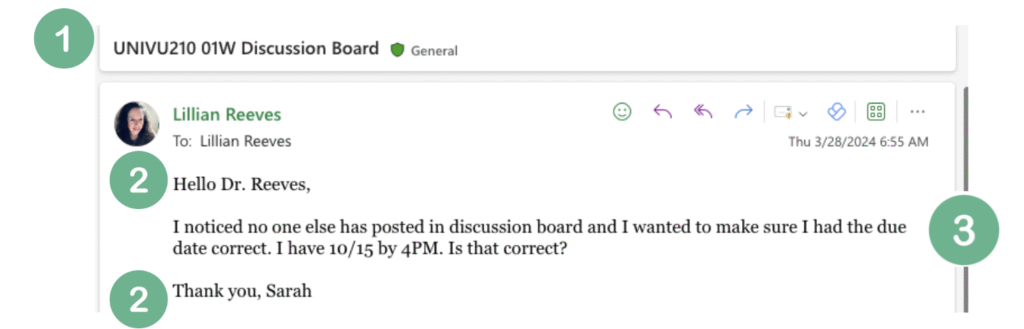
Email is the information currency of the professional world, and the number one way professional people communicate. Focus on the subject line, greeting, body of the email, and signature to demonstrate professionalism in your email communication.
Subject Line

When emailing faculty, include a brief description of what the email is regarding and the course and section number. This info can be found at the top of the Blackboard page.
Example: UNIVU210-01W Discussion Board.
Professional Address

Address your instructor (or employer) in the opening line, then sign your name at the end of the email. By addressing the person you’re emailing in the way they prefer to be addressed, you help them focus on your request.
Example Greeting: Dear Dr. Smith or Prof. Smith,
Example Signature: Thank you, Sarah Jones
Body of the Email
Share your questions or other content in 3-5 clear sentences. If you cannot express your needs in that space, consider visiting office hours or setting up a virtual meeting.
Example: Dear Dr. Smith, I noticed no one else has posted in the discussion board and I wanted to make sure I had the due date correct. I have 10/15 by 4pm. Is that correct? Thank you, Sarah Jones

Before You Hit Send

- Know that you are writing to someone who will answer your questions, who is willing to help you, and who wants to see you succeed.
- Know that your questions and confusion are valid and you can ask them without embarrassment.
- Practice using a neutral, professional tone.
- Review your email for grammar, spelling, and clarity.
Anatomy of a Professional Email
Peer Evaluations Can Lead to Teaching Excellence
Peer teaching evaluations can make even exceptional educators feel anxious or skeptical. But they don’t have to. As long as teaching and learning have worked together to create dynamic classroom environments, the educator and the peer observer have benefitted from this formative collaboration. And here’s how.
Continue reading “Peer Evaluations Can Lead to Teaching Excellence”