
By fall semester, Forbes, Reddit, the NYT, and Berkeley Engineering were among the legions describing 2023 as the soft launch of the “the AI revolution”. CAIFS (Center for Academic Innovation and Faculty Support) also anticipated the permanence of AI and kicked-off the fall semester with faculty guidance and discussion on the emerging multitudes of AI tools. Some particular attention was given to how to use AI to streamline, standardize, and improve aspects of our own practices. (see TIP blog from September 7 for more information about ways faculty can use AI).
Continue reading “Faculty Spotlight: Colby King”
Breaking Bread: Take a Student to Coffee or Lunch
When you sit down together at the Spartans Table, you belong.
The Spartans Table program offers students, faculty, and staff an opportunity to interact in informal settings in the Spartan Cafe in the Sansbury Campus Life Center or the Perk Up Cafe in the Library. Have your lunch or afternoon coffee on us.

Belonging Matters
To belong in a space is to feel accepted, valued, heard, seen, and comfortable. It is to be recognized as a fellow human sharing the same journey. Advising and mentoring practices that humanize our relationships with each other increase students’ sense of belonging and make it easier for them to succeed.
One great way to break the ice in a relationship is by breaking bread together. Spartans Table makes it easy for faculty and staff who work with, mentor, advise, or teach students to engage in these informal relationship-building activities.
How to Get Started
- Faculty or staff fill out this request form
- Upon completion of the form, you will be emailed tickets for yourself and your student(s)
- Redeem the tickets at the cashier’s station
- Fill out the very brief survey that will be emailed to both you and your students following your meeting.
*Faculty/staff may participate in the program twice per term. Expenses may be covered once per student, per course, per term.
Conversation Starters
- What is your favorite place on campus and why?
- What classes are you looking forward to taking and why?
- What is the most surprising thing you’ve learned so far?
- What out of class experiences are you most excited about?
- When you have faced challenges in the past, how have you addressed them?
- Where you do imagine yourself in five years, and what’s your next step to getting there?
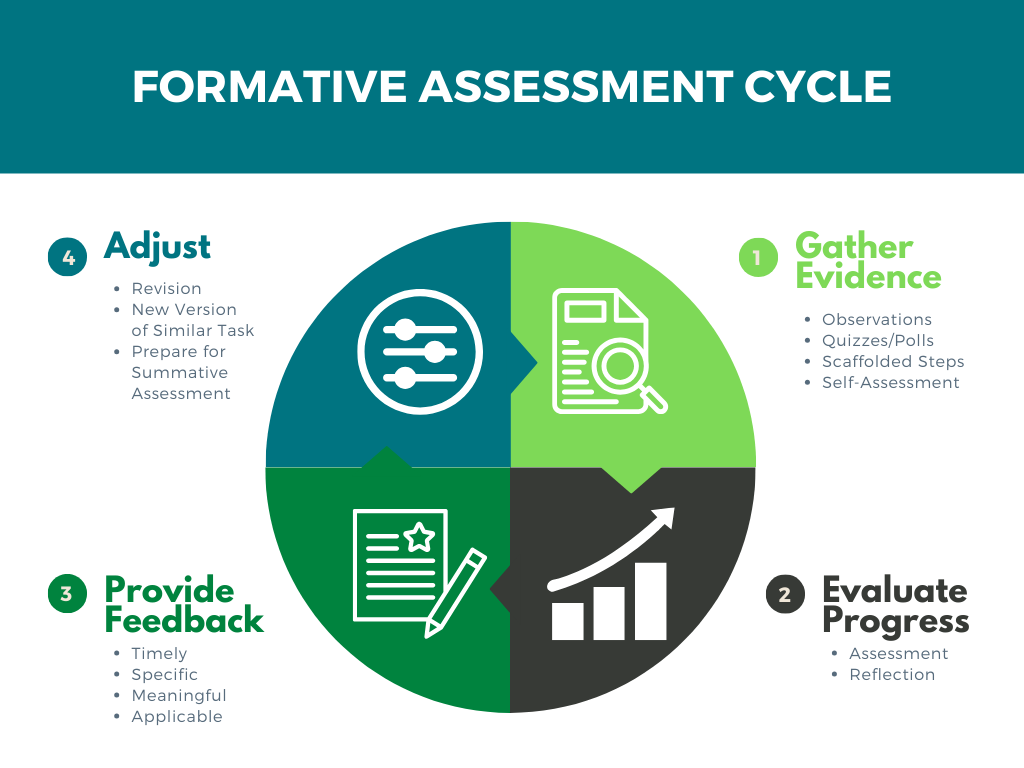
Formative Assessment and Success-Oriented Feedback
Formative assessment is often discussed in K-12 settings as a standard and expected part of curriculum delivery. In higher education, however, conversations about formative assessment have been somewhat more elusive. Traditionally, we rely on the high-stakes midterm, project, paper, final model which leaves little room for formative assessment that can foster growth.
Using formative assessments is a valuable curriculum practice that allows faculty and students to monitor student progress toward completing larger, summative assessments and achieving the course’s learning objectives. But what makes formative assessment a valuable tool for academic progress?
Continue reading “Formative Assessment and Success-Oriented Feedback”
Making the Case for Modules
Are we ready for modules?
Yes! And there is no better time to switch to modules from nested folders. In Blackboard Original, faculty were able to use the folder system just like the content containers on our computers. A file for P and T: files for service, teaching, scholarship; and within scholarship an articles folder; and in that folder works published for 2021, 2022, 2023; articles in the works that didn’t get published yet; and within that folder, proposals for any number of my million dollar ideas… anyone else have one of those? By the time we’ve gotten to the million dollar idea folder, we are eight folders deep in clicking and scanning.
Continue reading “Making the Case for Modules”
Are You Ready for Blackboard Learn Ultra?
Blackboard Learn Ultra represents the final phase of our four-year upgrade of our Learning Management System (LMS) at USC Upstate and the entire University of South Carolina System. With the launch of Blackboard Learn Ultra as the default course format across the University of South Carolina System in Fall 2024, we will be adopting the most up-to-date LMS experience within all our courses and giving our students a unified, consistent experience that has been shown to improve student success.
Blackboard Learn Ultra Upgrades 2019-2024
- December 2019: Blackboard Ultra Base Navigation introduced us to a Blackboard home page and institutional page that worked on any device and integrated image- and icon-based ways to navigate to courses and organizations.
- Spring 2020: Blackboard Collaborate Ultra became home base for our virtual class meetings during the COVID-19 pandemic.
- Fall 2020: Our first faculty cohort piloted the Blackboard Learn Ultra Course View, creating courses that adapt to any of the devices our students use.
- 2021: The Master’s of Nursing program switches to Blackboard Learn Ultra Course View.
- 2022: Our facilitator-led online teaching certification course moves to Blackboard Learn Ultra.
- Fall 2023: 17.6% of all USC Upstate courses are delivered in the Blackboard Learn Ultra Course View.
- Winter 2024: University of South Carolina System Learning Management System (LMS) Review Committee begins assessment of learning management systems to determine the best LMS option to adopt at the end of our Blackboard contract.
- Spring 2024: The Master’s of Education in Applied Learning and Instruction switches to Blackboard Learn Ultra Course View.
- Spring 2024: All new USC Upstate students are enrolled in the Blackboard Ultra for Students Quick Start course, and students complete their placement tests in Ultra Course View.
- Summer 2024: End of USC System contract with Collaborate. Zoom becomes the USC System virtual meeting platform within Blackboard courses, with meeting recordings being saved in the Panopto Video platform. The Student Attendance Quiz becomes part of all new Blackboard courses.
- Fall 2024: Blackboard Learn Ultra becomes the default course format for all new courses.
About Blackboard Learn Ultra
Blackboard Learn Ultra courses are lighter, more accessible, more flexible on various devices and filled with more white space than courses in the Blackboard Original Course View. They provide students with ways to track their course progress and instructors with ways to view student activity in the course–right from the course item or gradebook. Ultra courses can work less like a file/folder structure in a computer and more like a guided learning experience. In sum, they are worth taking the time to convert.
The vast majority of current courses make use of just a few course design features: files, video links, folders, discussions, assignments, and tests. Converting content for courses like these will typically involve checking the gradebook settings, recalculating the overall grade, and clicking a button to add the discussions to the content page for ease of access.
Frequently Asked Questions
How do I navigate in Blackboard Learn Ultra?
The analogy I like to give is like rotating the x- and y-axes of your course. The content headings you may have customized on the left in Original Course View will now appear in the main content area on the right in Blackboard Learn Ultra. The tools you found in the lower left control panel in Original appear across the top in Blackboard Learn Ultra. The content options you find along the top of the page in Original unfold in menus on the right-hand side in Ultra. When I first converted, I found myself tilting my head a lot to try to get used to the new orientation.
One great Easter egg in course navigation is the Blackboard Learn Ultra Roster in the left-hand menu. Here, you can see photos, pronunciations, and preferred name for students who have used those settings. In addition, you can set accommodations for students who receive time and a half or double time on tests and other timed work. One click inside the roster ensures that students receive their accommodations on every timed assignment throughout the course.
How do I add content in Blackboard Learn Ultra?
It all starts with a + (plus sign). In Blackboard Learn Ultra, you move your cursor where you want to place content, hover between existing items, then click the + (plus sign) that appears. You’ll Create Documents to add your own text, images, videos, embed codes from websites, or combinations of materials; Upload to add files; Create Discussions, Tests, Assignments, or Journals for graded work; or click Content Market to add embedded tools like Perusall, VoiceThread, YuJa, VitalSource, My Course Evaluations, or related features. You can Copy any item from the same course or any other Blackboard course directly from the plus sign on the Content page. The USC Upstate Blackboard Guide offers tips for using these features of Blackboard Learn Ultra in your courses.
Don’t like where something is? Just drag and drop it where you want it to go.
How do I grade in Blackboard Learn Ultra?
Instructors can access several Original Course View Control Panel features all from within the Gradebook. The Gradeable Items view works like “Needs Grading.” Grid View functions like the Full Grade Center. Student view gives you the equivalent of the Student Grade Report, provides the analytics of a User Activity Report, and lets you make exceptions to due dates right from inside the Gradebook. Clicking the settings gear icon brings you to grading schema, grading categories, rubrics, and retention notifications all on a single page.
Quick Tip: Disable automatic zeros in the Gradebook settings until you need to calculate midterm or final grades to avoid student panic early in the term. You can toggle automatic zeros on and off to control when and how often in the term students are assigned a zero for all missing work.
Where can I learn more about the systemwide transition to Blackboard Learn Ultra?
The University of South Carolina System’s go.sc.edu/Ultra page provides updated information about the systemwide transition process, including systemwide workshops and drop-ins. At USC Upstate, our calendar features Let’s Talk Teaching drop-in hours the first Friday of every month as well as Blackboard Day on January 5–all focused on preparing for the Blackboard Learn Ultra Launch in Fall 2024. We will be launching a new self-guided course geared toward teaching in Blackboard Learn Ultra in spring 2024.
You can also book an appointment with a member of CAIFS to talk about the Ultra conversion.
Group Work and Collaborative Learning
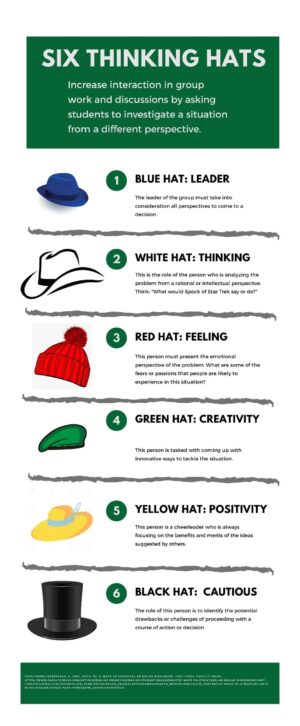
Collaborative learning is a well-established high-impact practice (HIPs). According to the Association of American Colleges and Universities, collaborative learning has two main goals: the first is to have students work together to solve problems or find solutions. And the second is for students to gain access to perspectives, experiences, and information they may have not yet considered or had access to. Collaborative learning can be a small pair-share experience after a micro-lecture or it can be a larger, weeks-long group research project.